Article · AI on Fabric
What is a Power BI semantic model, and why AI needs one
A Power BI semantic model in plain words: what it holds, why Copilot and Fabric data agents depend on it, and a checklist before Q&A retires.


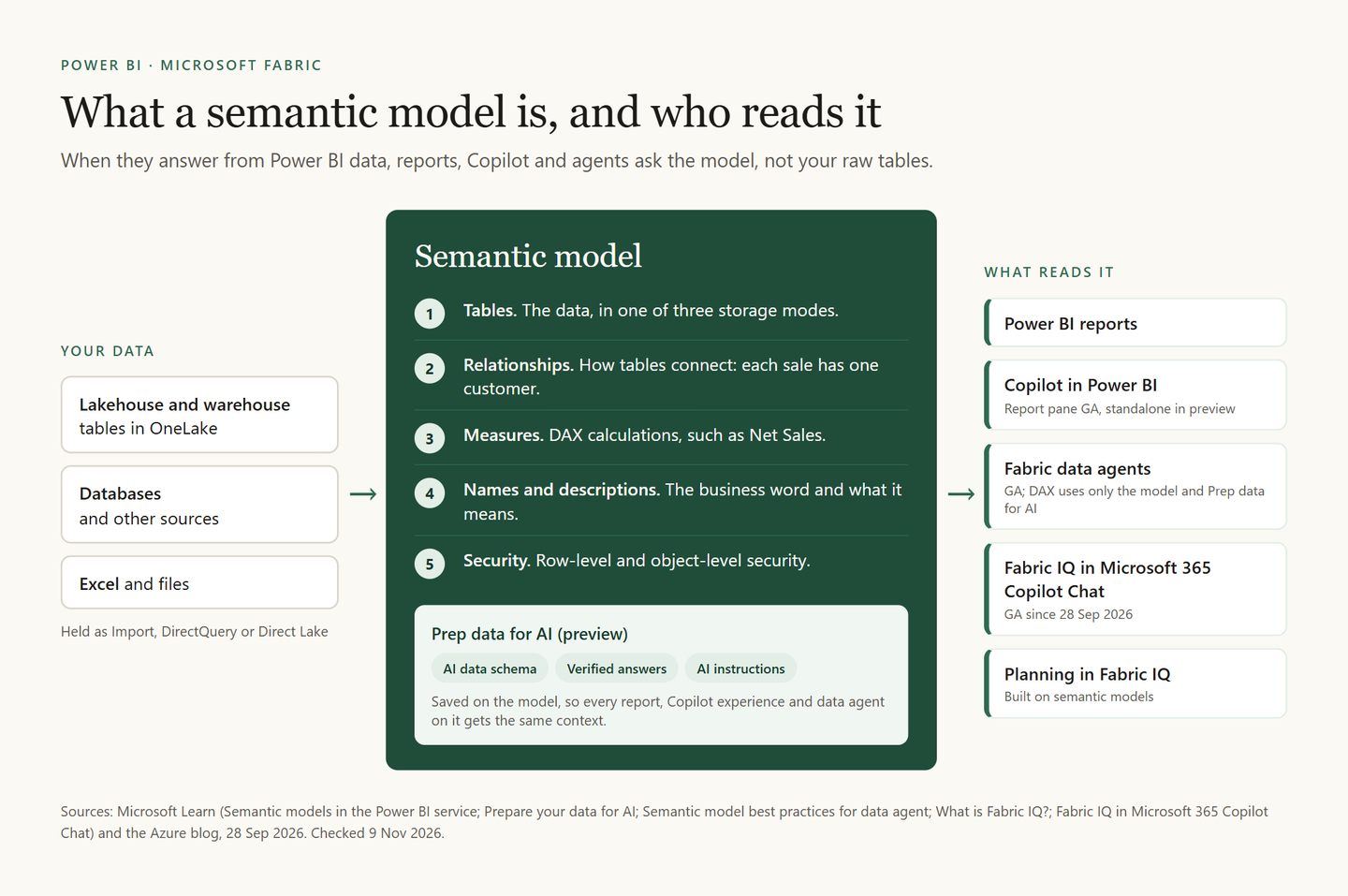
A Power BI semantic model is the layer between your data and everything that reads it: the tables, the relationships between them, the measures that calculate your numbers, their business names and descriptions, and the rules for who may see which rows. When Copilot, a Microsoft Fabric data agent or Fabric IQ answers a question about your Power BI data, it reads that model, not your raw tables, so the model decides how good the answer is.
If you have published a Power BI report, you have already built one. Below: what is inside, what AI needs from it, what to do before Power BI Q&A goes away, and which storage mode to pick. Microsoft facts checked on Microsoft Learn, 9 November 2026.
What is a semantic model in Power BI?
A semantic model is the part of Power BI that turns tables into business numbers. A report does not calculate anything on its own. It asks the model, and the model answers.
Inside a semantic model you find five things:
- Tables. The data itself, held in one of three storage modes: Import, DirectQuery or Direct Lake.
- Relationships. How the tables connect, for example that each sale belongs to one customer and one date.
- Measures. The calculations, written in DAX, such as Net Sales or Gross Margin %.
- Names and descriptions. The business word for each table, column and measure, and what it means.
- Security. Row-level security (RLS) decides which rows each person may see. Object-level security hides whole tables or columns.
Until November 2023, Microsoft called it a dataset. In Microsoft Fabric, the semantic model is also one of the two core items of Fabric IQ. The other is the ontology (preview), which can be generated from a semantic model, but that is a topic for another article.
Why do Copilot and data agents need a semantic model?
An AI can read a column called TR_AMT. It cannot know that your finance team means revenue after returns. At the Tallinn Data Week morning on 21 October 2026, the example from the stage was simple: if a model holds two definitions of revenue, an AI may not know which one to take.
Each AI experience reads the model in its own way:
- Copilot in Power BI uses the semantic model when a question is about the data. Otherwise it answers from general knowledge.
- A Fabric data agent writes DAX against the model. Its DAX tool uses only the model's metadata and Prep data for AI, and ignores instructions typed into the agent. So keep the model's rules on the model.
- Fabric IQ in Microsoft 365 Copilot Chat was announced as generally available on 28 September 2026. It answers from the semantic models behind Power BI reports, with the user's own permissions, RLS included. Its answers are as fresh as the model's last refresh.
- Planning in Fabric IQ is built on semantic models. Their dimensions and measures flow into planning sheets.
| Who reads the model | What it uses | What it needs |
|---|---|---|
| Copilot in a report (GA) | The model and Prep data for AI | A workspace on F2 or bigger, or P1 |
| Fabric data agent (GA) | Only the model and Prep data for AI | An F2 or bigger, or P1, capacity |
| Fabric IQ in Copilot Chat (GA) | Reports and their models | A paid Microsoft 365 Copilot licence |
Two Estonian teams told the same story at Tallinn Data Week. Liis Rush of Äripäev first handed Qlik scripts straight to AI, and the numbers came out wrong. It worked once her team wrote the business context down. In her words, scripts say how a number is calculated, not what the business means by it. Her Qlik to Power BI migration story shows the whole process.
Aaron Lee Amarga of NabuMinds tested a data agent on 80 real questions, and it answered 75% correctly. After his team fixed the field descriptions and the business preferences in Prep data for AI, it scored 93%, then 95% on 80 new questions. His data agent test method is a good next read. To let an AI assistant query or change a model directly, see which Power BI MCP server to use.
What happens to Power BI Q&A, and what should you do before February 2027?
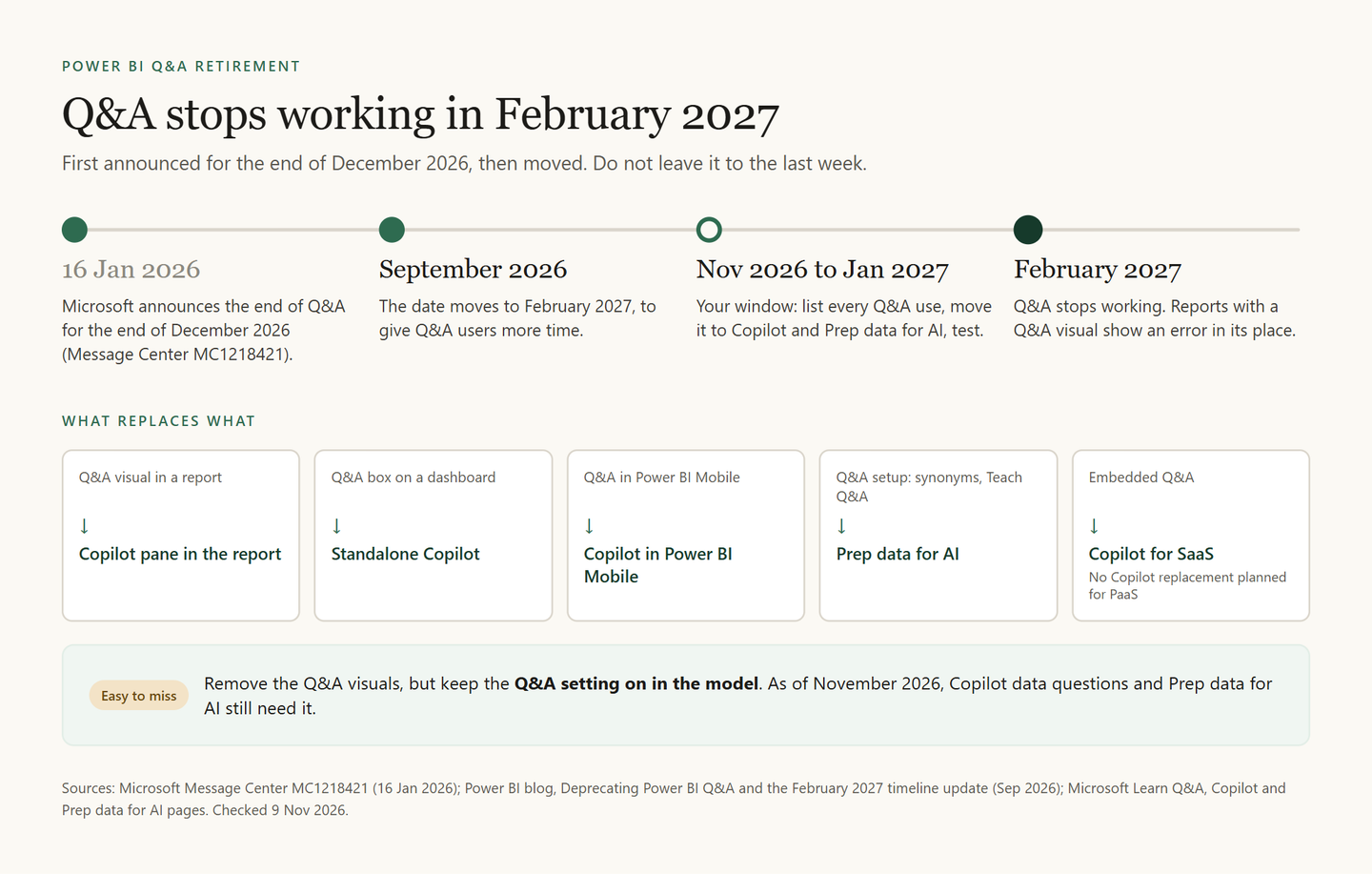
Power BI Q&A, the older feature that turns a typed question into a chart, is being retired. Microsoft first set the end of December 2026 (Message Center MC1218421, 16 January 2026). In September 2026, a reminder on Microsoft's Power BI updates blog moved it to February 2027. Learn's Q&A pages now say February 2027, though a few pages still say December, so do not leave it to the last week.
Everything goes: the Q&A visual, the dashboard Q&A box, Q&A in mobile and embedded reports, and Q&A setup. A report that still holds a Q&A visual will show an error in its place.
| Where you use Q&A today | Use instead |
|---|---|
| Q&A visual in a report | The Copilot pane in the report |
| Q&A box on a dashboard | Standalone Copilot |
| Q&A in Power BI Mobile | Copilot in Power BI Mobile |
| Q&A setup | Prep data for AI |
| Embedded Q&A | Copilot for SaaS; none planned for PaaS |
One detail is easy to miss. As of November 2026, Learn still says Copilot data questions and Prep data for AI need the Q&A setting on in the model, because Copilot builds its queries with the same engine. So remove the Q&A visuals, but leave that setting on. Learn's data agent guide says a replacement setting will follow after Q&A retires.
List every Q&A dependency
Reports with Q&A visuals, dashboards, mobile and embedded use, and the synonyms and Teach Q&A terms in Q&A setup.
Check that Copilot can run
Copilot needs a workspace on F2 or bigger, or P1, in a supported region, with the Copilot tenant setting on. Trial capacities do not count. Pro workspaces can use Copilot through a Fabric Copilot capacity.
Move what Q&A setup knew
Write the terms your team taught Q&A into AI instructions, for example: when a user says ABCD, they mean the Total Invoice field.
Turn your best Q&A answers into verified answers
Convert a Q&A result into a standard visual with its convert icon, then set that visual as a verified answer. A Q&A visual itself cannot be one.
Test, approve and tell people
Ask the Copilot pane your users' real questions. When the answers hold, approve the model and update your help pages.
How do you prepare a semantic model for AI?
Microsoft calls it Prep data for AI: a button on the Home ribbon in Power BI Desktop and on the semantic model page in the Power BI service, still marked preview on Learn. What you set there is saved on the semantic model, not on a report, so every report, Copilot experience and data agent on that model benefits.
But it comes second. Learn is plain about the order: extra instructions cannot fix wrong relationships or wrong aggregations. Fix the model first, then describe it. Print this checklist and tick it off for each model.
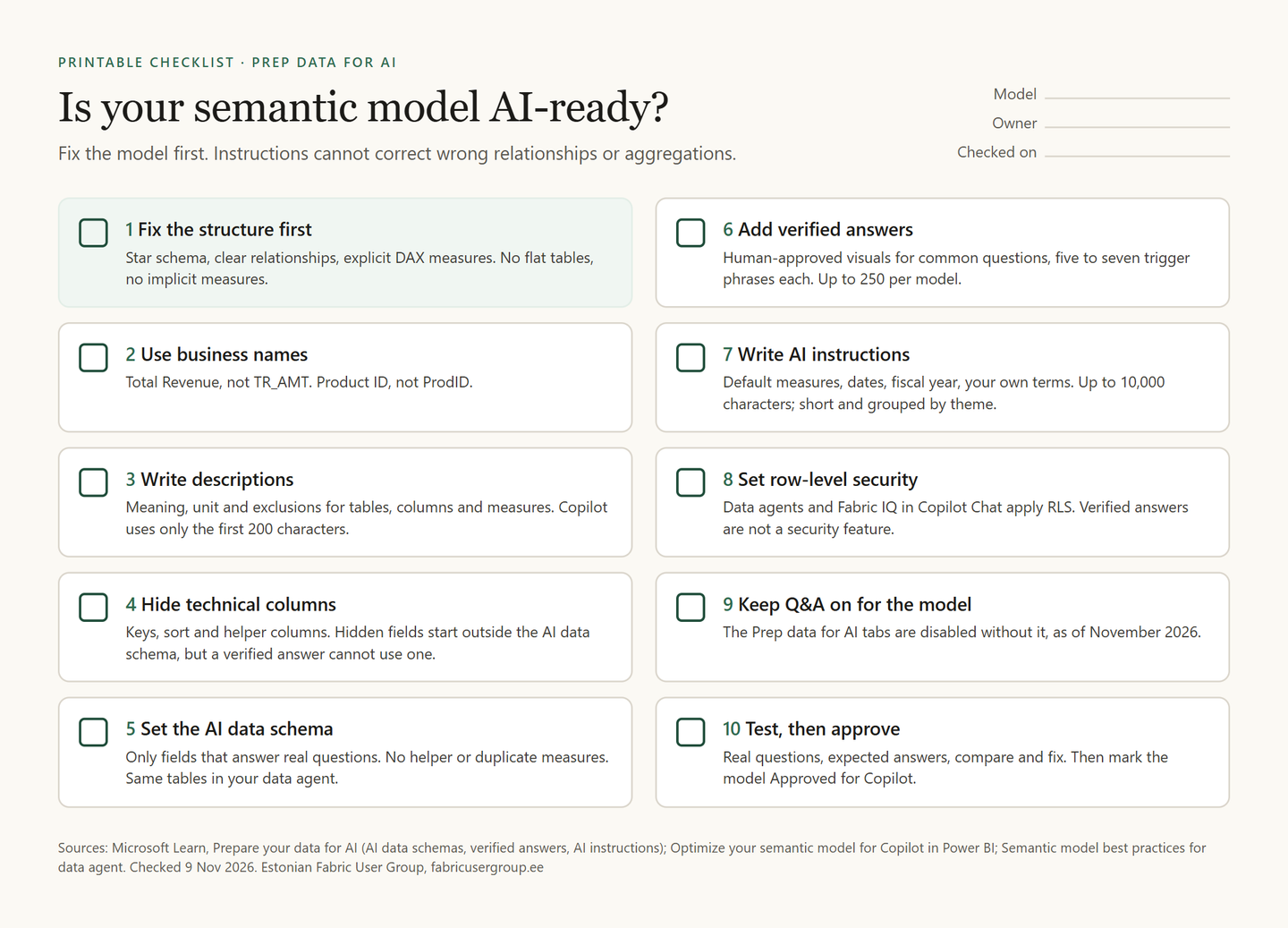
- Fix the structure. A star schema, clear relationships, explicit measures. Learn lists flat tables and implicit measures among the common pitfalls.
- Use business names. Total Revenue, not TR_AMT.
- Write descriptions. Meaning, unit and exclusions for each table, column and measure. Copilot reads only the first 200 characters, so start with the meaning.
- Hide technical columns. Hidden fields start outside the AI data schema. One catch: a verified answer does not work with a hidden field.
- Set the AI data schema. Only the fields that answer real questions. Leave out helper and duplicate measures, and pick the same tables in your data agent.
- Add verified answers. Human-approved visuals for common questions, with five to seven trigger phrases each. Copilot does not return them while Fabric IQ is on in the report pane.
- Write AI instructions. Default measures, date logic, fiscal year, your own terms. The limit is 10,000 characters, and Learn warns that the AI may not follow them exactly.
- Set row-level security. Data agents and Fabric IQ in Copilot Chat apply RLS. Verified answers are not a security feature.
- Keep Q&A switched on for the model. The Prep data for AI tabs are disabled without it.
- Test, then approve. Write down real questions and the answers you expect. In Power BI Desktop, the skill picker and "How Copilot arrived at this" show what Copilot used. Compare, fix, repeat, then mark the model Approved for Copilot. Until then, standalone Copilot warns that answers from that model may be low quality.
Import, DirectQuery or Direct Lake: what changes for AI?
The storage mode decides where the data sits and how fresh it is. Copilot and agents answer from whatever the model holds at that moment.
- Import copies the data into the model. Queries are fast, and the data is as fresh as the last refresh. Any licence works, Free and Pro included.
- DirectQuery leaves the data in the source and sends every query there. The numbers are current, but queries are usually slower.
- Direct Lake loads Delta tables from OneLake into memory as queries need them. A refresh copies only metadata and takes seconds. It needs a Fabric capacity.
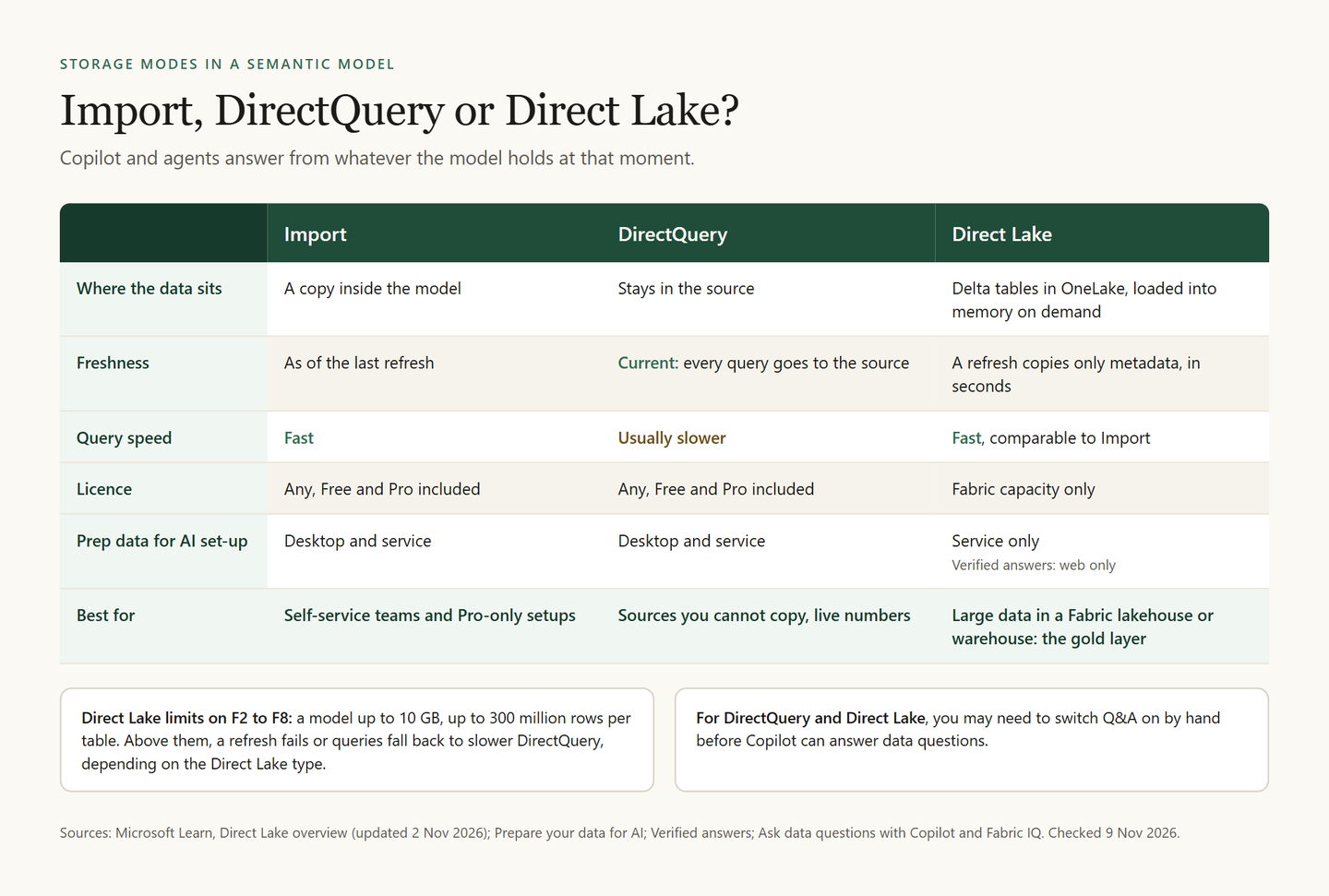
Three details matter for AI. Power BI Desktop supports Prep data for AI only for Import, DirectQuery and local composite models, so you set up a Direct Lake model in the Power BI service. Verified answers work on Direct Lake models in the web only. And for DirectQuery and Direct Lake models, you may need to switch Q&A on by hand.
Which one to choose:
- Only Pro licences, no Fabric capacity: Import.
- Large data already in a Fabric lakehouse or warehouse: Direct Lake, which Learn calls an ideal choice for the gold layer.
- A source you cannot copy, or numbers that must be live: DirectQuery.
- An analyst who cannot change the lakehouse: Import tables next to the Direct Lake ones.
NabuMinds runs its Gold-layer semantic models in Direct Lake, as Aaron Lee Amarga describes. Äripäev aims for about five core semantic models and expects to end up with around ten.
Where else do semantic models come up in the Estonian community?
At the April 2026 meetup at Arrow ECS Baltic, Rein Parelo of Optime spoke about planning in Microsoft Fabric with Fabric IQ: no-code budgeting, forecasting and scenario modelling on top of OneLake. Planning sits on semantic models, so a clean model pays off there too.
Frequently asked questions
Is a semantic model the same as a Power BI dataset?
Yes. Microsoft renamed datasets to semantic models in November 2023. It was a rename only, and the Power BI REST API still says dataset.
Why is Copilot greyed out in Power BI?
Usually one requirement is missing: a workspace on a paid capacity (F2 or bigger, or P1, never a trial), the Copilot tenant setting, or a supported region. After you buy or scale up a capacity, Copilot can take up to 24 hours to appear.
Does Copilot use Fabric capacity?
Yes. Copilot spends capacity units as background operations, visible in the Fabric Capacity Metrics app. DAX queries it triggers are billed on top, in the usual way. Our Fabric pricing article explains how capacity works.
Can Power BI Pro users use Copilot?
Not with Pro alone. An admin can set up a Fabric Copilot capacity on F2 or P1 or bigger and assign users to it. They can then use Copilot in Pro and PPU workspaces, billed to that capacity. Separately, users with a paid Microsoft 365 Copilot licence can ask Fabric IQ in Copilot Chat about reports in Pro and PPU workspaces too.
What is the difference between a Fabric data agent and Copilot in Power BI?
Copilot comes preconfigured inside Power BI. A data agent is an item you configure, with up to five data sources such as semantic models, lakehouses and warehouses, and you can publish it to Microsoft 365 Copilot, Copilot Studio or Teams. On a semantic model, both read the same Prep data for AI settings.
Is Fabric IQ included in Microsoft Fabric?
Yes. Fabric IQ is a group of Microsoft Fabric items, including semantic models, data agents, planning and the ontology (preview). They run on your Fabric capacity: data agents need F2 or bigger, or P1, and planning is part of the Fabric SKU with its own billing meters. Fabric IQ in Microsoft 365 Copilot Chat needs a paid Microsoft 365 Copilot licence for each user, and Microsoft said it adds no AI token costs.