Article · Capacity and costs
How Microsoft Fabric pricing works in 2026, in plain words
Microsoft Fabric pricing in plain words: what F2 to F32 capacities cost in euros, when you need Power BI Pro, and when to reserve.


Almost everyone in the room at the Tallinn Data Week satellite event on 21 October 2026 used Power BI. Only a few ran Microsoft Fabric. So part of my talk answered the question that usually comes first. How does Microsoft Fabric pricing work, and what does it cost in euros?
This article writes that part out in plain words. It also adds what two Estonian teams, Äripäev and NabuMinds, told the room about their own capacity that same morning.
In short
- You pay for a capacity: a fixed block of computing power that all of Fabric shares. You do not pay per tool.
- The smallest capacity, F2, cost about €240 a month pay-as-you-go. A one-year reservation was about 41% cheaper.
- Below the F64 size, everyone who views reports needs a Power BI Pro licence. From F64, viewers need no paid licence.
- Start on a trial capacity, then pay as you go, and reserve only the size you have measured.
- Äripäev runs about 100 users on an F8. NabuMinds started on an F16 and needed more.
How does Fabric capacity pricing work?
In Fabric you do not pay for each tool. You buy a capacity: a fixed amount of computing power, rented from Microsoft. Everything draws from that one pool: pipelines (jobs that move data), the warehouse, semantic models, reports and Copilot. One price, one invoice.
A semantic model is the layer behind a Power BI report. It holds the tables, how they connect, and the calculations the report shows.
On stage I put it simply: "See it as buying a server." You pick a size and pay for that size. A bigger workload needs a bigger size.
Capacities are named F2, F4, F8 and so on. The number is the count of capacity units (CU). Double the number and you get double the power, at roughly double the price.
What if you need more than your capacity?
A capacity can run above its size for a short while. This is called bursting. Afterwards it recovers in quieter moments.
Fabric also spreads your use over time, which is called smoothing. Night-time loads are spread over 24 hours and report use over 5 minutes. So a heavy nightly data load does not need a big capacity.
There is no autoscale. You scale up one step at a time, and you decide when. If you push a capacity too hard for too long, reports slow down before anything breaks. For a month-end peak, an option still in preview helps. You pay the excess at three times the normal rate instead of buying a bigger size.
That is why I told the room not to fear the end of the month: "You cannot get a bill of 20,000 euros at the end of the month because you left the server running."
What does each capacity cost?
There are two ways to pay. Pay-as-you-go is billed per second, with no commitment, and you can pause the capacity. A reservation is a one-year commitment that costs about 41% less.
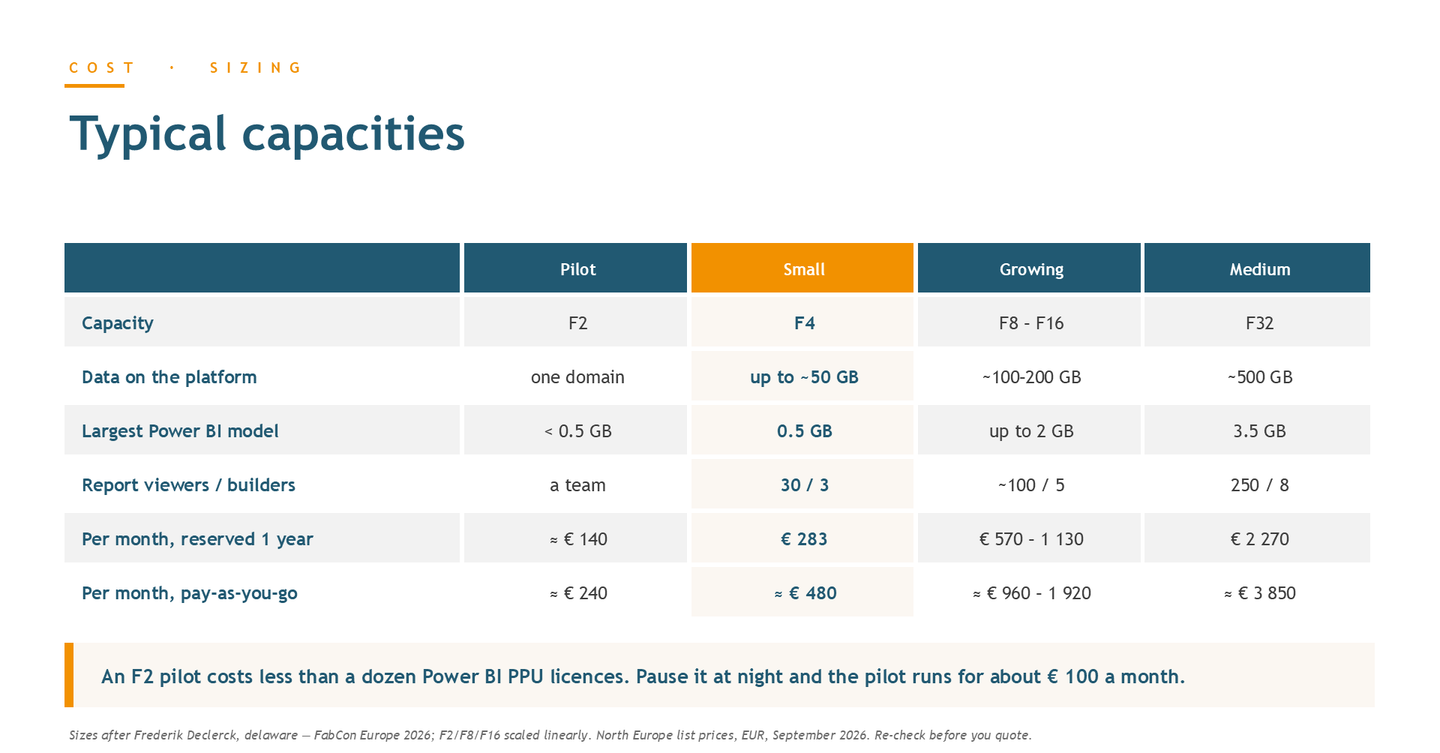
The sizes below are a rough planning guide, not Microsoft's limits. They follow Frederik Declerck's (delaware) talk at FabCon Europe 2026, with F2, F8 and F16 scaled linearly. All prices are per month.
- Pilot, F2: one business area, the largest Power BI model under 0.5 GB, one team. About €240 pay-as-you-go, about €140 reserved.
- Small, F4: up to about 50 GB of data, the largest model about 0.5 GB, 30 report viewers and 3 builders. About €480 pay-as-you-go, €283 reserved.
- Growing, F8 to F16: about 100 to 200 GB of data, models up to 2 GB, about 100 viewers and 5 builders. About €960 to €1,920 pay-as-you-go, €570 to €1,130 reserved.
- Medium, F32: about 500 GB of data, the largest model about 3.5 GB, 250 viewers and 8 builders. About €3,850 pay-as-you-go, €2,270 reserved.
The pay-as-you-go figures assume the capacity runs all month. An F2 pilot costs less than a dozen Power BI Premium Per User (PPU) licences. Pause it at night and it runs for about €100 a month.
Do you still need Power BI licences?
Yes, below the F64 size. Your Power BI licences stay valid. What the size changes is who needs one.
Below F64, every report viewer needs a Power BI Pro licence, and so does every builder. The Power BI Pro licence price on my slide was €12.10 per user per month. The capacity comes on top. For almost every company in the room, this was the right model.
From F64, nobody needs a paid licence just to view reports. Only builders keep Pro. On stage I added that it can pay to go straight to F64, just to save on licences.
My slide put the break-even at about 190 report viewers. In Estonia, that means a large company. Below that, buy the smallest capacity that fits and keep Pro.
Here is a worked example with the small profile. 30 viewers and 3 builders need 33 Pro licences, about €400 a month. A reserved F4 adds €283, so the whole setup is roughly €680 a month. If those people already have Pro, the capacity is the only new cost.
Pay as you go, or reserve?
Start on a trial capacity. Microsoft lets you build on one before you pay, and on stage I called the trial generous. Use it to build your first use case.
Then pay as you go for roughly the first six months. Pause development and pilot capacities at night and at weekends. That takes about 65% off their bill, the easiest cut to your Microsoft Fabric cost. A paused capacity serves nothing, so never pause the one your morning reports run on.
Meanwhile, watch the Microsoft Fabric Capacity Metrics app. It shows what actually uses your capacity.
Reserve once a capacity would run more than about 59% of the month. A reservation costs about 59% of a full month of pay-as-you-go, and you pay it whether the capacity runs or not. For an F4 that is €283 a month instead of €480, about €2,400 a year saved. Reserve the size you measured, not the one you guessed.
Why run more than one capacity?
You will often need more than one: for development, for testing and for production. That way changes are tested before the business sees them. Development can run on a small capacity that pauses at night.
One shared capacity is risky. Pipelines and report use eat from the same pool. One heavy or real-time report can then slow everything else down. This is called throttling.
NabuMinds kept development and production on separate capacities from day one.
Does AI cost extra?
Not as a separate licence. Copilot and Fabric data agents, which answer questions about your data in plain language, spend the capacity you already pay for. That covers both the AI reasoning and the queries it runs.
In my second talk that morning, I put one data agent question at about 0.44 CU hours. That keeps an F2 busy for about 13 minutes. Operations agents watch live data on their own schedule, so they use capacity even when nobody asks them anything.
Plan for agents as you would for Copilot. Once they are more than a pilot, give them their own capacity, so they do not slow down your reports.
What did Äripäev and NabuMinds learn about capacity?
Äripäev: about 100 users on an F8
Liis Rush is head of data and business platform at Äripäev, which is moving its Qlik reports to Fabric. In the Q&A she said the team leaned heavily on the trial at the start. Today they run on an F8.
They have about 50 core users and about 50 lighter users. That is close to the growing profile in the list above. The team is still deciding which licence the lighter users need. Liis expects the capacity to grow next year, when everyone moves to the new reports.
NabuMinds: started on an F16, then needed more
Aaron Lee Amarga is head of business intelligence at NabuMinds, a data and CRM consultancy in Tallinn. His team moved a payments client from a reports-only Power BI setup to Fabric, after a short kickstart with Sparkle. They started on an F16.
That was not enough. They had underestimated how much data the client's transactions produce. Aaron's warning for anyone with yearly budgets: "It's easier to downsize than to upsize, because asking for more money is another business case."
At first, finding out what used the capacity took guesswork, together with the data engineers. Today his team monitors the capacity itself and investigates the spikes. He called one lesson the most important of all: treat capacity as a cost model from week one.
Frequently asked questions
How much does Microsoft Fabric cost per month?
The smallest capacity, F2, cost about €240 a month pay-as-you-go, or about €140 with a one-year reservation. An F4 cost about €480, or €283 reserved. These are North Europe list prices from September 2026, so check Microsoft's current list.
Is there a Fabric trial capacity?
Yes. You can start on a trial capacity and build your first use case before you buy one. After that, pay as you go until you know the size you need.
Do report viewers need a Power BI Pro licence?
On capacities below F64, yes. Every viewer and every builder needs Pro, listed at €12.10 per user per month. From F64, viewers need no paid licence and only builders keep Pro.
Can I get a surprise bill for Fabric?
Not because you left something running. You pay for the size you chose, not for each query. When the load is too high, reports slow down before anything breaks.
When should I reserve a capacity?
When it would run more than about 59% of the month. A one-year reservation was about 41% cheaper than pay-as-you-go. Reserve the size you measured, not the one you guessed.
The programme, the recording and the other talks from that morning are on the 21 October event page.