Article · Capacity and costs
Is Microsoft Fabric the same as Power BI? A plain answer
Power BI is one part of Microsoft Fabric. When you need a Fabric capacity, which licences you need, and what happened to Power BI Premium.


No: Power BI is one part of Microsoft Fabric, Microsoft's wider data platform, where it is the reporting workload. You can keep using Power BI on its own with Pro or Premium Per User licences, and you need a paid Fabric capacity only when you want the rest of the platform, or want people to view reports without a paid licence.
The licensing facts here were checked against Microsoft Learn on 9 November 2026. For euro prices, read the group's Fabric pricing article and check Microsoft's current price list.
How are Power BI and Microsoft Fabric related?
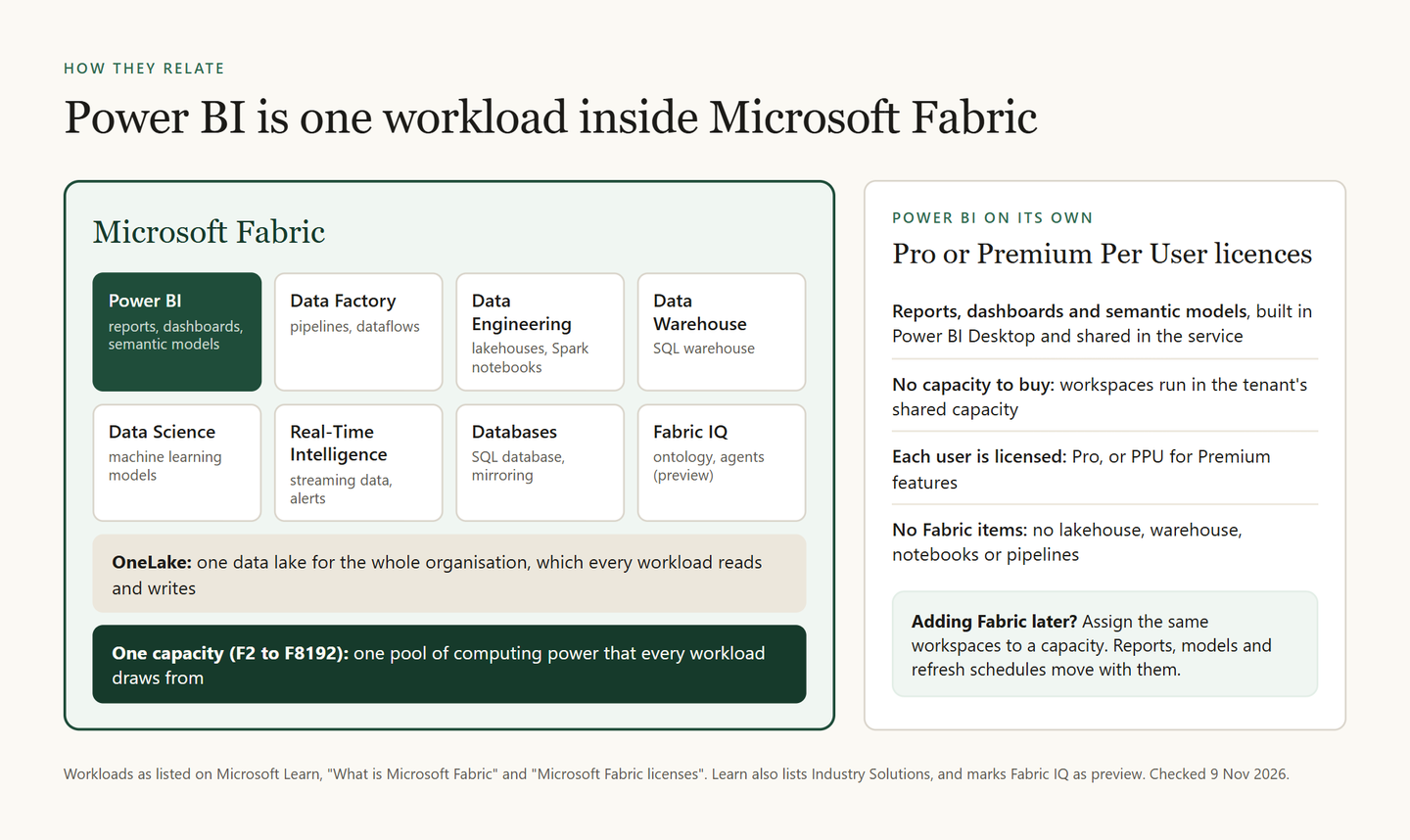
Think of Fabric as a building and Power BI as one room in it. Microsoft Learn lists Power BI as one of Fabric's workloads, next to Data Factory, Data Engineering, Data Warehouse, Data Science, Real-Time Intelligence, Databases and Fabric IQ, which is still in preview.
All of them keep their data in OneLake, one logical data lake for the whole organisation. And all of them run on the same capacity. A capacity is a fixed pool of computing power that you rent from Microsoft, and every workload draws from it.
Power BI still works on its own, too. Learn describes the Power BI service as both standalone and integrated with Fabric, with shared administration and licensing.
So is Power BI renamed to Fabric? No. It keeps its name, Power BI Desktop and its licences. What changed is the frame around it: the admin portal, the capacities and the free licence now carry the Fabric name.
What does Fabric add that Power BI does not have?
Power BI covers the last mile: semantic models, reports and dashboards. A semantic model is the layer behind a report. It holds the tables, how they connect and the calculations.
Fabric adds the road before that last mile.
| You want to | Power BI alone | With Fabric |
|---|---|---|
| Build reports and semantic models | Yes | Yes |
| Prepare data with Power Query | Dataflows | Dataflows and pipelines |
| Keep data in a lakehouse or warehouse | No | Yes |
| Run Spark notebooks | No | Yes |
| Use Real-Time Intelligence | No | Yes |
The licence rule follows the same line. Learn's licensing page says that to use Fabric workloads beyond Power BI, you need an F capacity or a Fabric trial capacity.
Which items count as Power BI items?
Microsoft Learn splits items into two groups, and the licence rules follow that split.
- Power BI items: reports, semantic models, dashboards, paginated reports, scorecards, metric sets, dataflows, datamarts, org apps and explorations.
- Other Fabric items: everything else, such as lakehouses, warehouses, notebooks, pipelines, eventhouses and KQL databases.
To create Power BI items in a shared workspace, you need Pro or PPU. A free licence is enough to create the other Fabric items, as long as the workspace runs on an F capacity or a trial.
Do you need Microsoft Fabric to use Power BI?
No. You can run Power BI on Pro licences alone. You need a Fabric capacity in two main cases: you want Fabric items, or you want people to view reports without a paid licence.
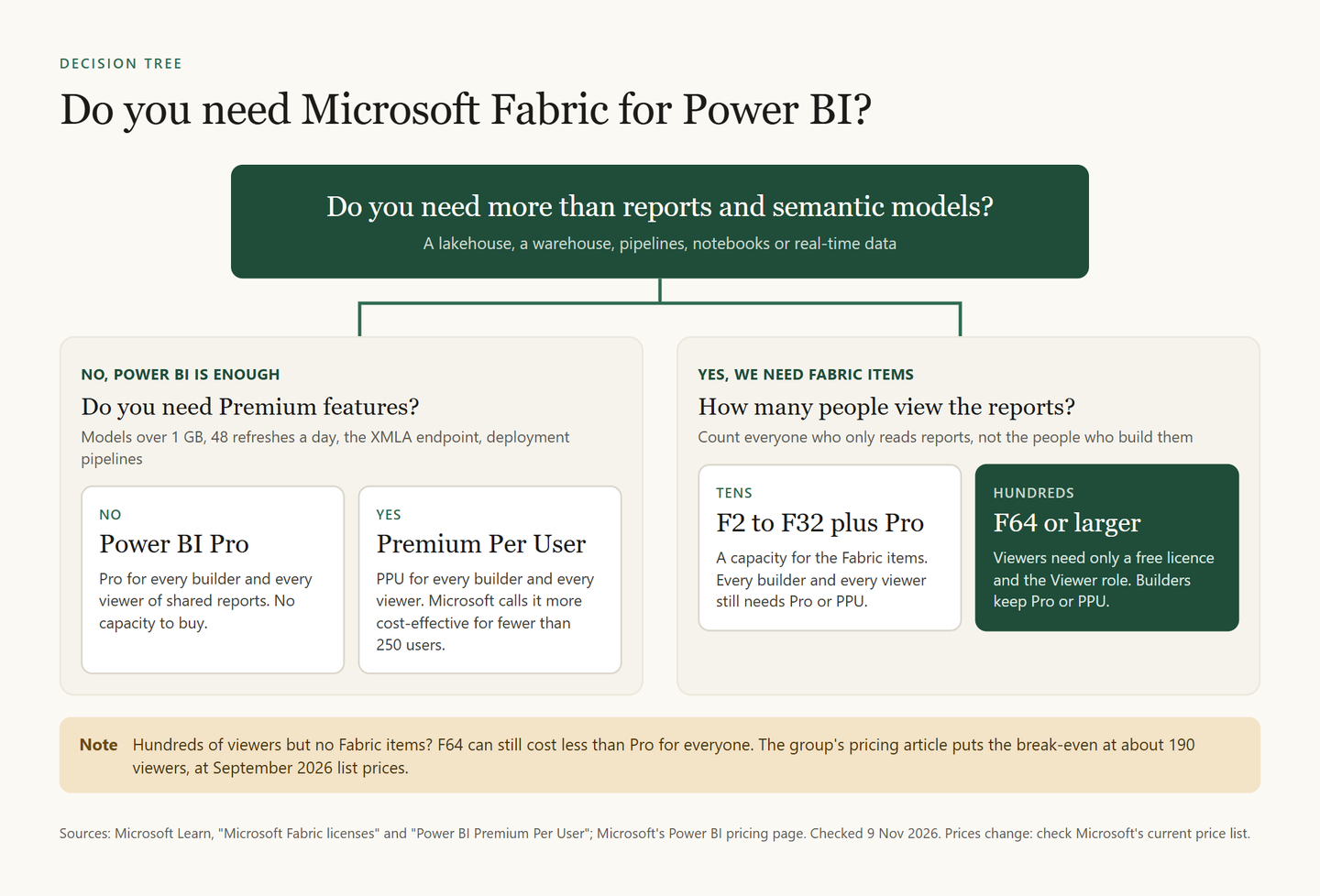
The four outcomes in plain words:
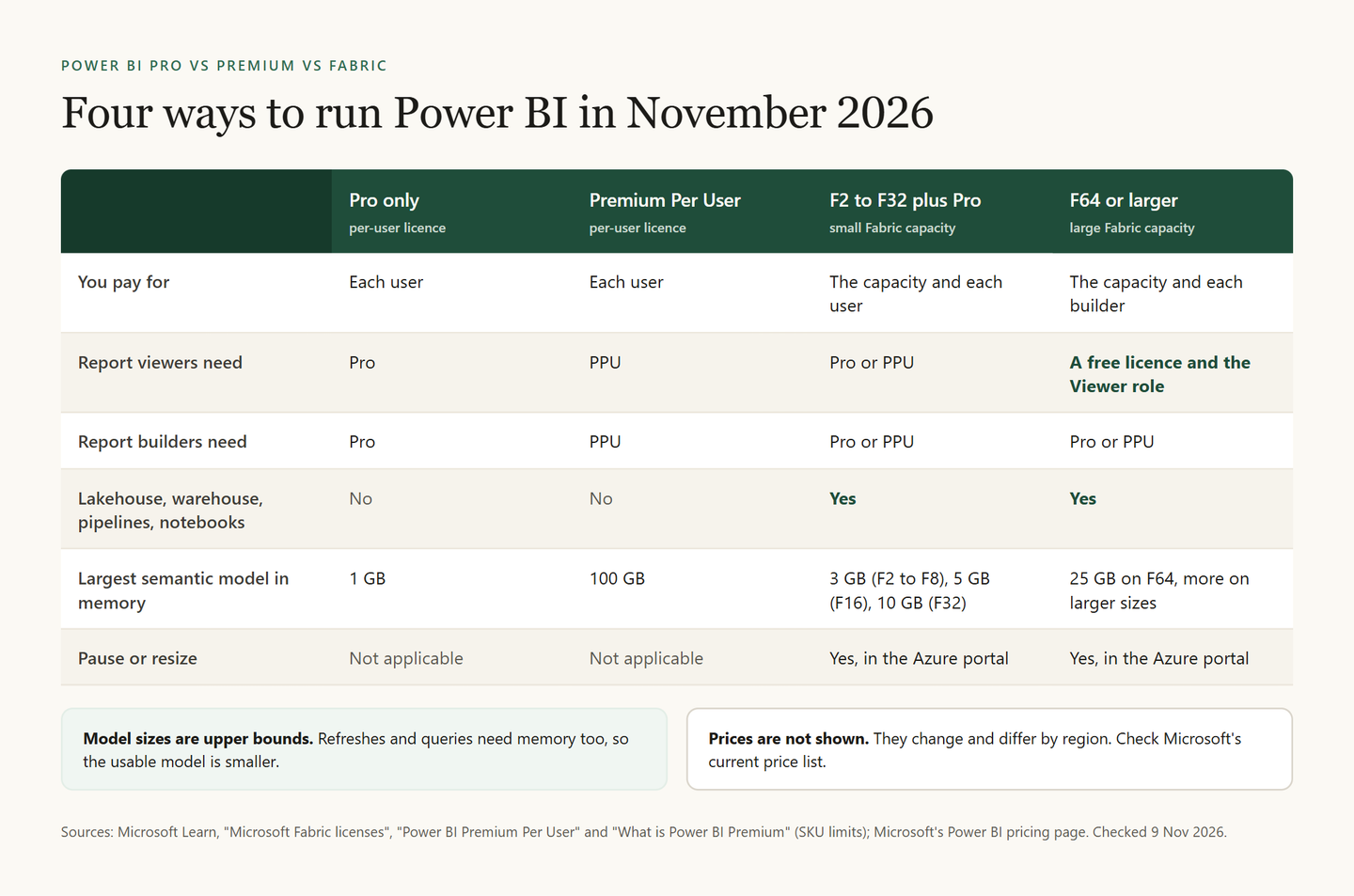
- Pro only. Everyone who builds or views shared reports has Power BI Pro. There is no capacity to buy. Some plans already include Pro: Microsoft 365 E5 and Office 365 E5 do.
- Premium Per User. Everyone who builds or views the content has PPU. You get Premium features without a capacity: models up to 100 GB instead of 1 GB, 48 refreshes a day instead of 8, the XMLA endpoint and deployment pipelines. Learn calls PPU more cost-effective for fewer than 250 users.
- F2 to F32 plus Pro. You buy a small capacity for lakehouses, warehouses and pipelines. Every report viewer and builder still needs Pro or PPU. The group's pricing article, from a talk on 21 October 2026, calls this the right model for almost every company in that room.
- F64 and up. Viewers need only a free Fabric licence and the Viewer role on the workspace. Builders keep Pro or PPU. The same pricing article puts the break-even at about 190 report viewers, at September 2026 list prices.
Does Power BI Pro or Premium include Fabric?
Pro: no. Pro gives you no capacity, so no lakehouses or notebooks.
Premium Per User: no, as above.
Premium per capacity (P1 to P5): partly. P capacities support Fabric items once a Fabric admin switches them on. But P SKUs are retiring, as the next sections show.
One change is on the way. On 28 September 2026, at FabCon Europe in Barcelona, Microsoft announced that Pro and PPU customers will get Fabric Apps at no additional cost, with database capabilities up to 1 GB per app. Fabric Apps is still in preview, and on 9 November 2026 Learn's Fabric Apps page (updated 3 November) still listed a workspace with Fabric capacity as a prerequisite. Check the status before you plan around it.
What does Fabric capacity mean in Power BI?
A capacity is the engine your workspaces run on. Without one, Power BI workspaces live in a shared capacity, and each person's licence decides what they can do. With one, you assign workspaces to it, and its size decides how much computing power they get.
Fabric capacities are called F SKUs. The number is the count of capacity units (CU), so an F64 has 64 CU.
The size also sets the licence rule, and F64 is the line.
| Capacity | Who can view reports |
|---|---|
| F2 to F32 | Only people with Pro or PPU |
| F64 and up | Anyone with a free licence and the Viewer role |
Bigger capacities also hold bigger semantic models. Learn's SKU table gives a memory limit of 3 GB per model on F2 to F8, 5 GB on F16, 10 GB on F32 and 25 GB on F64. These are upper bounds, because refreshes and queries need memory too. For comparison, PPU allows models up to 100 GB.
You can try first. A Fabric trial runs for 60 days on an F4 or F64 size. If you have no PPU licence, it comes with a Power BI individual trial. Copilot and data agents are not available in a trial.
What each size costs, paid by the hour or reserved, is in the pricing article.
What happened to Power BI Premium?
"Premium" now means two different things, and only one of them is going away.
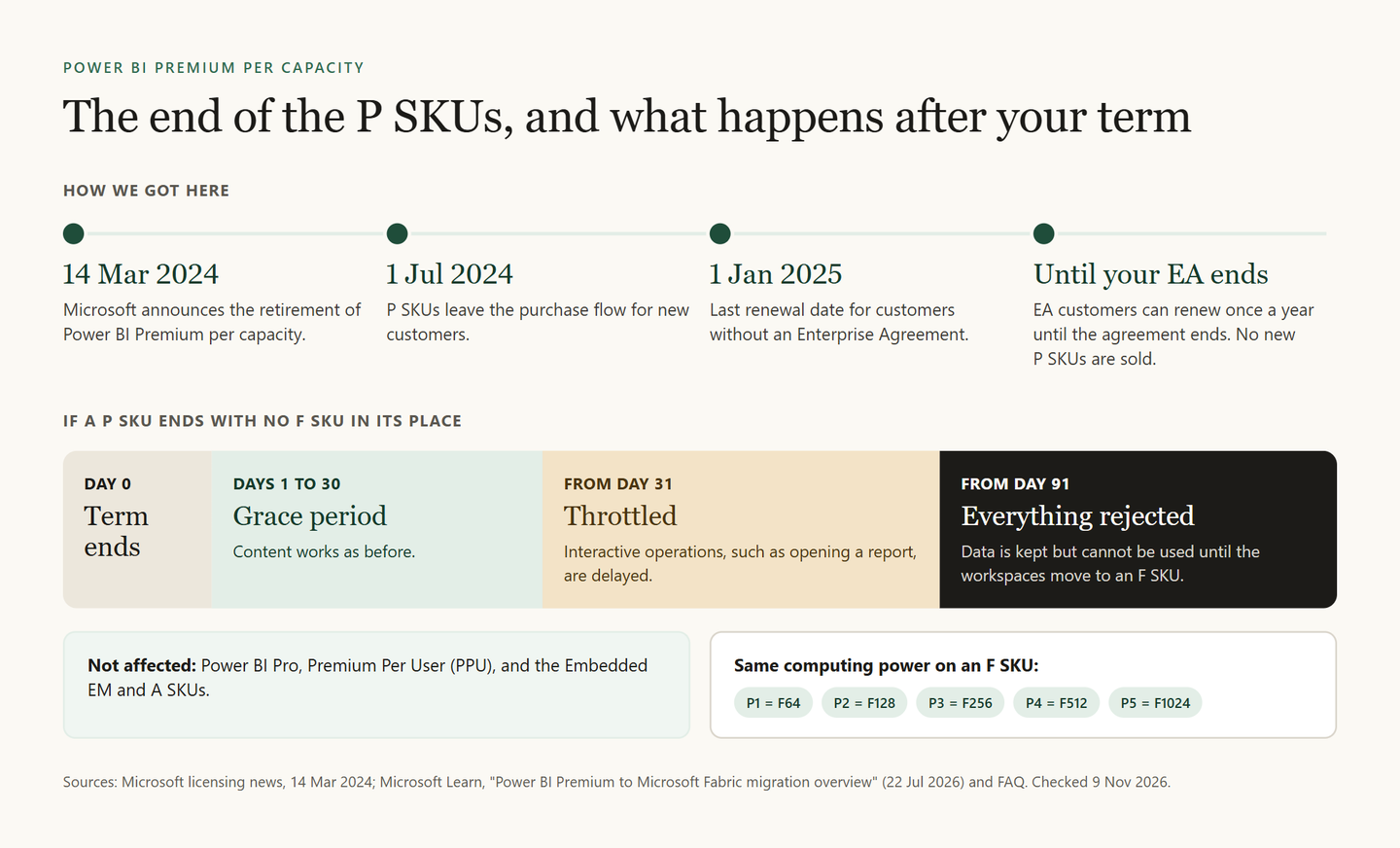
- Premium Per User (PPU) is a per-user licence. It is not retiring.
- Premium per capacity (P1 to P5) is retiring. Microsoft announced it on 14 March 2024, and P SKUs left the purchase flow for new customers on 1 July 2024.
Learn's migration overview (22 July 2026) is plain about it. Each P SKU subscription ends at the end of its current agreement term, and Microsoft no longer sells new ones. Customers with an active Enterprise Agreement can renew once a year until the agreement ends.
If a P SKU ends with nothing in its place, a clock starts. For 30 days there is a grace period. From day 31, access is throttled, which means interactive operations such as opening a report are delayed. From day 91, all operations are rejected. The data is kept, but nobody can use it until the workspaces move to an F SKU.
The move itself is a licence change, not a rebuild. Reports, semantic models, apps and refresh schedules move with the workspace. The migration FAQ recommends this order:
Measure
Install the Microsoft Fabric Capacity Metrics app and look at the last 30 to 45 days of use on your P SKU.
Buy the F SKU first
Start from the same computing power (P1 to F64) in the same Azure region, then right-size from what you measured. A move to another region is harder: large semantic models and Fabric items have to be backed up and recreated there.
Reassign and validate
Move the workspaces outside refresh windows. Then check refreshes, reports and gateways.
Cancel the P SKU yourself
It does not stop when you buy an F SKU. Cancel it in the Microsoft 365 admin center once everything works.
On an F SKU of the same size, most things work as before. Learn's FAQ lists the differences:
| Feature | P SKU | F SKU |
|---|---|---|
| Billing | Microsoft 365 subscription | Azure, per second or reserved |
| Autoscale | Optional | None: resize in the Azure portal |
| Pause | Not possible | Possible |
| Free viewers | Yes | From F64 |
| Report Server | Included | Via a reservation, or SQL Server EE with SA |
Is Power BI going away?
No. Learn states that Pro and PPU are not affected by the P SKU retirement and continue as they are. Microsoft also keeps adding to Power BI: in September 2026 it announced app creation from a semantic model in Power BI Desktop.
In September 2026, Microsoft counted more than 425,000 Power BI customers and more than 40,000 Fabric customers. Power BI is still by far the bigger of the two.
Two things are going away:
- The P SKUs, as described above.
- Power BI Q&A. Learn says Q&A experiences go away in February 2027 and points to Copilot for Power BI instead. Microsoft's earlier notices said December 2026, so older pages and posts may still give that date.
What did Estonian teams choose?
At the Tallinn Data Week satellite event on 21 October 2026, almost everyone in the room used Power BI, and only a few ran Fabric. The group's write-up of that morning sums up the opening talk: Power BI stays, and Fabric is everything around it. Workspaces, models and reports move as they are.
- Äripäev runs about 100 users on an F8: about 50 core users and about 50 lighter ones. Liis Rush said the team leaned heavily on the trial at the start. Äripäev is moving its Qlik reports to Power BI on Fabric, and the team is still deciding which licence the lighter users need.
- NabuMinds moved a payments client from a reports-only Power BI tenant to Fabric. Aaron Lee Amarga said they started on an F16, which turned out too small for the client's transaction volume. Development and production ran on separate capacities from day one.
Äripäev's F8 is below F64, where every report viewer needs Pro or PPU. The full story is in Äripäev and NabuMinds on moving to Microsoft Fabric, and the Qlik side in the Qlik to Power BI migration article. The talks are on the 21 October event page.
The group met again on 5 November 2026 at DIGMATIX Estonia. Marek Kõbu (DIGMATIX Estonia) shared fresh news and his main observations from FabCon Europe, and Mihkel Nugis (DIGMATIX Estonia) introduced what the Fabric app is and how it works in practice. The programme is on the November meetup page.
Frequently asked questions
Does Microsoft Fabric replace Power BI?
No. Fabric includes Power BI as one of its workloads, and Pro and PPU continue as they are. What Fabric replaces is Power BI Premium per capacity: F SKUs take over from P SKUs.
Is Microsoft Fabric free?
No, but you can try it. A Fabric trial gives you a capacity for 60 days. After that, Fabric items need a paid F capacity. The free Fabric licence is a user licence: it lets people work on a capacity that someone pays for.
Is Power BI Premium Per User going away?
No. Learn confirms that the retirement applies only to Premium per capacity (P1 to P5). PPU stays, and its users need no licence change.
What is the difference between Power BI Pro and Premium?
Pro is the basic per-user licence: models up to 1 GB and 8 refreshes a day. PPU adds Premium features per user: models up to 100 GB, 48 refreshes a day, the XMLA endpoint and deployment pipelines. Premium per capacity was the old capacity licence, now replaced by Fabric F SKUs.
Do I have to rebuild my reports to move to Fabric?
No. Moving a workspace to a Fabric capacity is a reassignment. Learn says semantic models, incremental refresh policies and refresh schedules move with the workspace, when you stay in the same Azure region.