Article · Migration
Äripäev's Qlik to Power BI migration with AI agents
How Äripäev runs its Qlik to Power BI migration: 89 reports cut to 46, a failed first AI try, then AI agents with an analyst approving every step.


At Äripäev we are moving our Qlik reports to Power BI on Microsoft Fabric. This Qlik to Power BI migration is the second phase of a bigger move to one data platform. Our first try at letting AI do the work failed. The second try, with AI agents doing the build and an analyst in control, works. I told this story at a Tallinn Data Week morning on 21 October 2026, and this is the written version.
In short
- We built the data platform first. The reports came second.
- A usage analysis cut 89 Qlik reports in use down to 46 to migrate.
- Handing Qlik scripts straight to AI gave wrong numbers. Writing the business context down first made it work.
- AI agents plan, build and test. An analyst approves each step, and nothing reaches production without review.
- A heavy report took about ten days to migrate. Now it takes two to four.
Who are we?
Äripäev is a leading business media and information provider in Estonia, mainly for other businesses. Many people still know us for the pink newspaper. We have about 250 employees and many business units. Each one runs like a business within the business: news, conferences, trainings, information services, books, radio and more.
I have worked at Äripäev for ten years. As head of data and business platform, I look after all our data, several CRM platforms and marketing technology. My team has nine people: three in data (two analysts and one engineer), two in CRM and four in marketing.
Qlik vs Power BI: why did we move?
This is not a feature comparison. Our Qlik reports were not the problem. In our workshops, users said there were too many reports and some metrics were duplicated. Overall they were happy, and the reports are well used.
What we lacked was a platform behind the reports. We used Qlik heavily, but we had no central data warehouse or lakehouse. Our data sat in many places. Our first need was not reporting but what sits behind it: pipelines, orchestration, and projects that need data from several systems.
So we moved to Microsoft Fabric and built a lakehouse there first. A lakehouse is one store for both files and tables. The reports followed in the next phase. Power BI is part of Fabric, so the new reports sit on the same platform as the data.
What came before the reports?
Our first business case was feeding data into marketing automation. Then came AI use cases: segmentation, lead scoring and article recommendations.
The lakehouse brings together about 20 source systems. It follows the medallion pattern: three layers that take data from raw, to cleaned, to ready for the business (often called bronze, silver and gold).
Phase two, under way now, is reporting. It has two parts: a customer 360 view and the move from Qlik to Power BI.
What is a customer 360, and why build it ourselves?
A customer 360 shows each customer in one place, across all systems. We have two CRMs: Salesforce for advertising and our own CRM for subscriptions. A third CRM, for our Latvian business, stays separate. On top of that comes Infopank, public registry data on Estonian companies.
Every vendor promises a customer 360, but none of them has all of your data. So we build it on our own data platform. One customer identifier goes back into the CRMs. The view holds subscriptions, activity, advertising purchases and company data such as sector and size.
Which Qlik reports are worth migrating?
Before building anything, we held workshops with focus groups. Then we ran a usage analysis of every Qlik report.
We had 89 reports in use. We dropped 18 and merged others. That left 46 to migrate, sorted into three tiers by usage and business criticality.
This is the cheapest step of any migration. Every report you drop is one you never have to rebuild or test.
Why were we too slow?
Even 46 reports were too many at our pace. The team was still learning the new platform. We had to keep the old reports running and answer ad hoc requests. Building a report meant manual drag and drop.
Our reports are heavy, with many pages and a lot of logic in the front end. One report took about ten days to migrate. AI already helped us write code. It did not help with semantic models or report design. A semantic model is the layer of tables, relationships and measures that the reports read from.
Why did the first AI attempt fail?
The first idea was simple. We pulled the Qlik scripts and object definitions out with the Qlik command-line tool. We handed them to AI and asked it to make the report.
It looked like a report. But the numbers were off, some of them completely. Where there was no data, AI made up metrics, such as scroll depth and total users. It duplicated charts, made too many pages and had no styling.
On stage I put it this way: “AI tried, but honestly the input wasn't good enough, and that's on us.” Scripts say how a number is calculated. They do not say what the business means by it.
What does AI need to know before it builds?
The second try was a real process, not a better prompt. A human reviews every step. The process rests on four things:
- everything is versioned in Git, and work starts in development;
- the business context is written down;
- access and governance are in place;
- the analysts stay in control.
Context is the foundation. Our engineer pulled every source, table and field from Fabric into Confluence. That came to about 4,000 data fields, and I described them. It went faster than I expected, because much of the business knowledge was in my head.
Then we went back to basics. Who is a subscriber? What is a product? Our product system has about 3,000 active services. We have many subscription models: print, digital or both. Without these answers, AI fills the gaps itself, as the first try showed.
How do the agents and the analyst share the work?
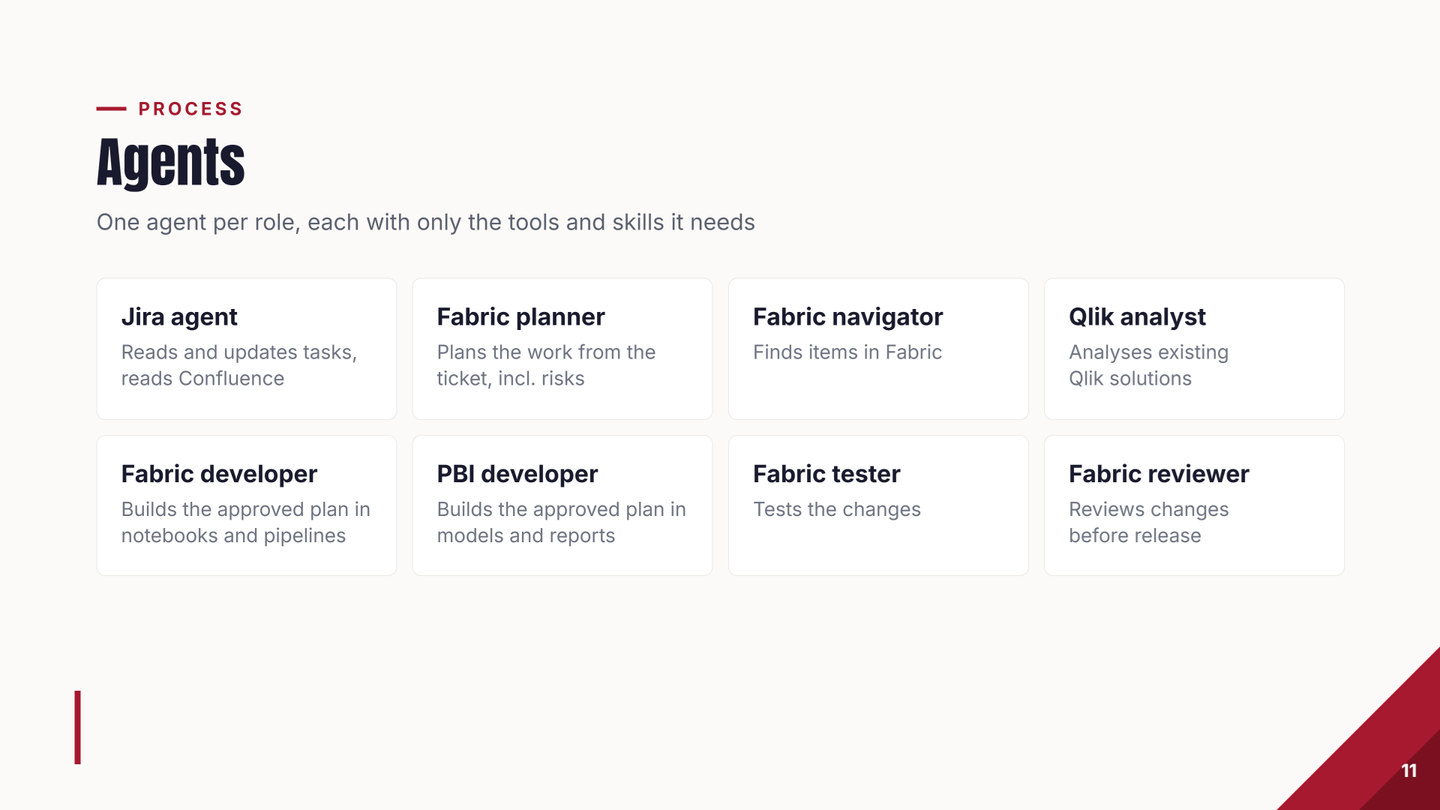
Every task starts in Jira, described as clearly as we can. Then the work moves through AI agents. An agent here is an AI model with one job, its own tools and its own instructions. Each agent gets only the tools and skills its role needs:
- a Jira agent reads and updates tasks and reads Confluence;
- a planner turns the ticket into a plan, with the risks;
- a navigator finds items in Fabric;
- a Qlik analyst studies the old Qlik solution, and it also finds old bugs in our Qlik setup;
- a Fabric developer builds in notebooks and pipelines, and a Power BI developer builds models and reports;
- a tester tests the changes;
- a reviewer checks the changes before release.
The analyst is in control from start to finish:
- The analyst describes the task in Jira.
- AI reads the task and drafts a plan.
- The analyst reviews the plan and confirms it.
- AI builds and tests.
- AI and the analyst review and approve the changes.
- AI and the analyst deploy the changes to production.
The analyst can step in during the build. A change goes to production only when the analyst is happy with it.
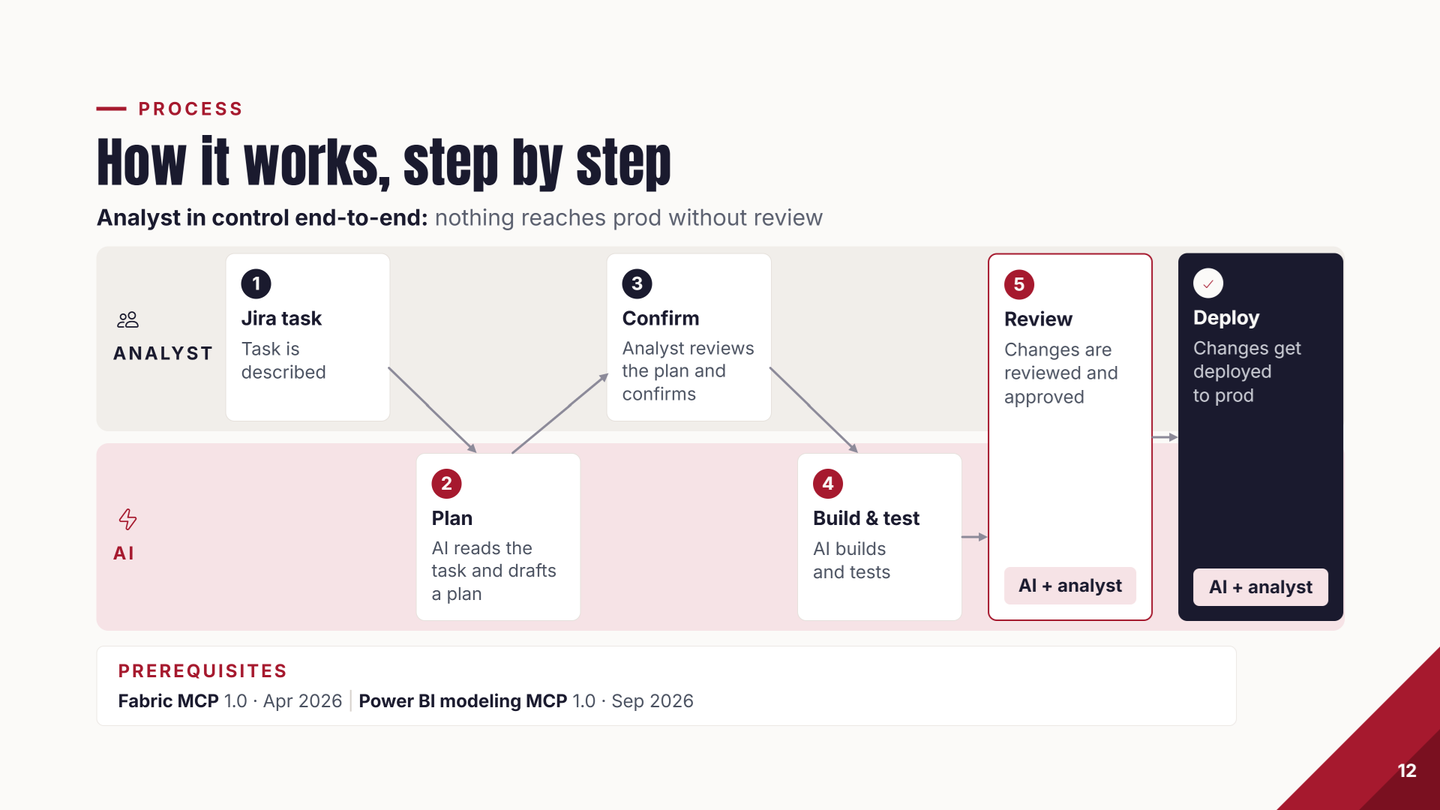
My slide lists two prerequisites: Fabric MCP 1.0 (April 2026) and Power BI modeling MCP 1.0 (September 2026). MCP, the Model Context Protocol, is a standard way for an AI agent to use a tool. Through these two, an agent works with Fabric items and Power BI semantic models directly. Jira and Confluence connect through the Atlassian MCP.
Does it really work?
On a Monday we were asked to show that it works. By Wednesday our engineer had migrated a marketing campaign report. It took about six hours, and the numbers were correct.
What changed for the team?
A heavy report took about ten days to migrate. Now it takes a few days, two to four. A change in the data layer takes half a day instead of two or three days. The team can save up to a third of its time.
It also changes how analysts work. They define, review and approve, and AI does the hands-on build. Every Fabric change now follows this flow, from Jira task to reviewed deploy. That takes some getting used to.
What does it run on, and what does it cost?
These questions came from the room after the talk.
- Testing. The agents write tests in Fabric notebooks that compare the numbers. A notebook is a page of code that runs in Fabric. We also check some results by eye.
- Report design. The agents get skills that describe our design principles, plus example templates.
- AI model. We use Claude. For data and engineering work, I think it is the best model at the moment.
- AI cost. Low: a team plan with some overage.
- Fabric capacity. A capacity is the block of computing power you buy for Fabric, in fixed sizes. Early on we leaned heavily on a trial. Today we run on an F8, and it will grow next year when everyone moves to the new reports.
- Users. About 50 core users and about 50 lighter ones, so about 100 in all. We are still deciding the licence policy for the light users.
- Semantic models. We aim for about five core models. It will probably end up around ten.
What would I tell another team?
- Context is huge. We are still improving ours.
- Governance takes effort. Plan time for it.
- You own the output. As I said on stage: “You own the output, even if AI helped you create it.” You cannot hand a report to the business and say AI made it. You own it, hallucinations included.
- Be ready to adapt. The tools change all the time.
What comes next?
We will grow the context layer and set up a process that keeps it current. We want conversational analytics on our semantic models, so users can ask questions in plain language. Next year we move our separate finance data warehouse onto the platform.
Qlik to Power BI migration: common questions
How long does it take to migrate one Qlik report?
For our heavy, multi-page reports it took about ten days by hand. With the agent flow it takes two to four days. One example, a marketing campaign report, took about six hours.
Can AI migrate Qlik to Power BI on its own?
Not in our experience. Our first try, Qlik scripts straight to AI, gave wrong numbers and made-up metrics. It worked once the business context was written down and an analyst approved every step.
Should you migrate every Qlik report?
No. Start with a usage analysis. We had 89 reports in use, dropped 18, merged others and kept 46 to migrate.
Which tools does the setup use?
Microsoft Fabric and Power BI, Git, Jira and Confluence. The agents reach them through Fabric MCP, the Power BI modeling MCP and the Atlassian MCP. The AI model is Claude.
Is it expensive?
The AI cost is low for us: a team plan with some overage. Fabric runs on an F8 capacity today and will grow when all users move to the new reports.
My talk and the rest of that morning's programme are on the 21 October event page.