Article · AI on Fabric
How to test a Fabric data agent before you trust it
How we tested a Microsoft Fabric data agent for a payments client in three rounds, from 75% to 95% accuracy, before a beta. With a checklist.


A Microsoft Fabric data agent lets people ask questions about their data in plain language. At NabuMinds we built one for a client in finance and payments. We tested it in three rounds before anyone relied on it, and its accuracy went from 75% to 95%. I told this story at Tallinn Data Week on 21 October 2026, and here it is step by step.
Why change a Power BI setup that works?
I opened my talk with an old rule: “If it ain't broke, don't fix it.” Our client's Power BI was not broken. Reports ran every morning and nobody complained. And that was exactly the problem.
In payments, a morning report comes too late. By the time it shows that something went wrong, the money is already gone.
NabuMinds is a data and CRM consultancy in Tallinn. We run this client's BI platform end to end, from data pipelines and semantic models to reports and alerts. We moved the client from a reports-only Power BI setup to Microsoft Fabric. This article covers two things we built there: a data agent and real-time alerts.
What is a Fabric data agent, and why did we need one?
A Fabric data agent is an assistant inside Microsoft Fabric. You ask it a question in plain language. It writes the query, runs it with your own access rights and shows how it got the answer.
The client's business sends our team at least ten ad hoc questions a week. Each one becomes a service-desk ticket. A typical one came from a payments manager: “Can you give me the list of customers who made a transaction with this specific payment method?”
The data to answer that question is already there. Still, the question waits until someone on our team picks up the ticket. An agent can answer it straight away.
What does the agent run on?
The agent reads the same data as the reports. Our data follows a medallion model, a common way to organise data in layers. Bronze holds the raw data, Silver the cleaned data, and Gold the aggregated tables that are ready to use.
On top of Gold sit the semantic models. A semantic model is what Power BI reports read: tables, relationships, calculations and business names. Ours use Direct Lake, so they read the Gold tables directly instead of keeping their own imported copy.
The agent is grounded on these Gold-layer semantic models. That way the agent and the reports work from the same definitions. The agent also has guardrails on its scope, its instructions and who has access.
Why treat the agent like an analyst?
With a dashboard, you decide how it is used. With an agent, you do not know what the business will ask. If it gives a wrong answer, trust is gone.
As I said on stage: “So I treat it like a separate analyst in my team.” For us, that meant two steps. First we taught it, then we tested it.
What did we teach the agent?
An agent can read table and column names. It cannot know what those names mean in your business. Pieter Jansen gave a simple example that morning: if a model has two definitions of revenue, the agent may not know which one to take.
So we taught it two things.
Field descriptions and relationships
Every field in the central semantic models has a description that says what it holds. Every join between tables is defined too. The agent then does not have to guess how a transaction links to a customer or to a payment method.
Business preferences
People rarely ask with the column name. They use their own words. So we added business preferences in Prep data for AI, a section in the settings of a Power BI semantic model.
These preferences are synonyms, correlations and instructions in plain language. One kind of instruction sums it up: “when people ask for this, they mean that”.
Pieter showed the same settings in his talk. His slide named four parts: descriptions and synonyms, the AI data schema, AI instructions and verified answers. The AI data schema is the part of the model the AI may use.
How did we test the agent?
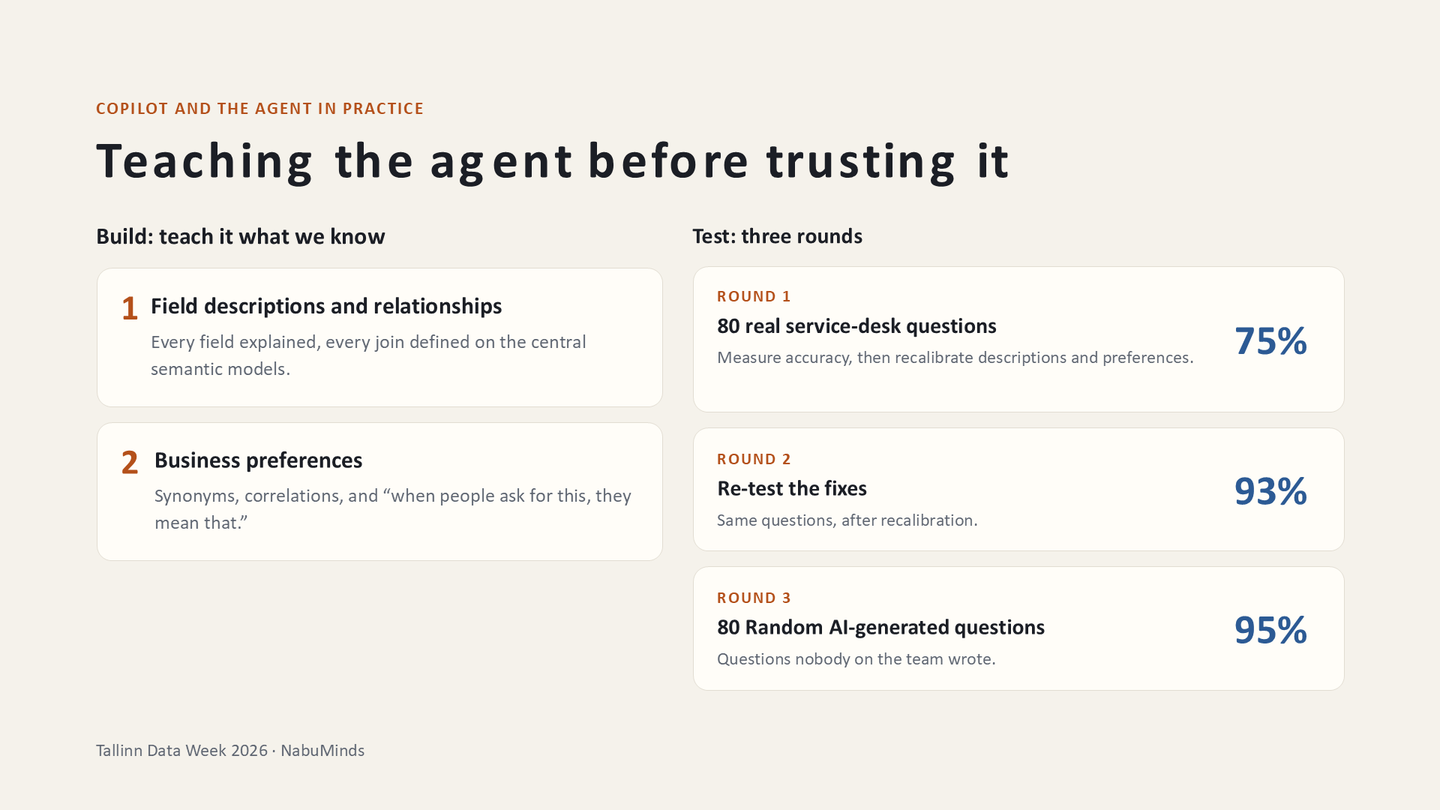
We tested it in three rounds, with 80 questions in each round.
Round 1: 80 real questions, 75% correct
We took 80 questions that the business had really sent to our service desk. The agent answered 75% of them correctly. In other words, one answer in four was wrong.
We isolated the wrong answers. Then we fixed the business preferences and field descriptions behind them.
Round 2: the same 80 questions, 93% correct
We ran the same 80 questions again, and the agent scored 93%. So the fixes worked. But we had tuned the agent on exactly these questions, so we needed a test it could not be tuned for.
Round 3: 80 new AI-generated questions, 95% correct
We let AI generate 80 random questions. Nobody on the team wrote them, so nobody could tune the agent to them. The agent answered 95% of them correctly.
With more time, I would have pushed towards 100%. Instead, we let real users try it.
Why run a beta with real users?
We deployed the agent to the client the week before my talk. It now runs as a one-month beta with 25 testers. The client's owner said it helped him investigate anomalies.
In the Q&A, we talked about learning from past questions. Tableau, our home ground, remembers them. Pieter answered for Fabric: a data agent can store example queries and example answers.
Every answer is also logged and kept for 28 days. So you can go back and see what users asked. In a beta, that log shows you the questions your testers really ask.
Does the agent need its own capacity?
In Fabric you pay for a capacity: a fixed amount of computing power that all your work shares. Pieter compared it to buying a server.
Our agents run on the client's single production capacity. So every question to the agent draws from the same pool as the reports and the data loads.
Pieter warned about this too. When a shared capacity is overloaded, Fabric slows work down, and one heavy report can slow everything. His slide advised giving agents their own capacity once they are more than a pilot.
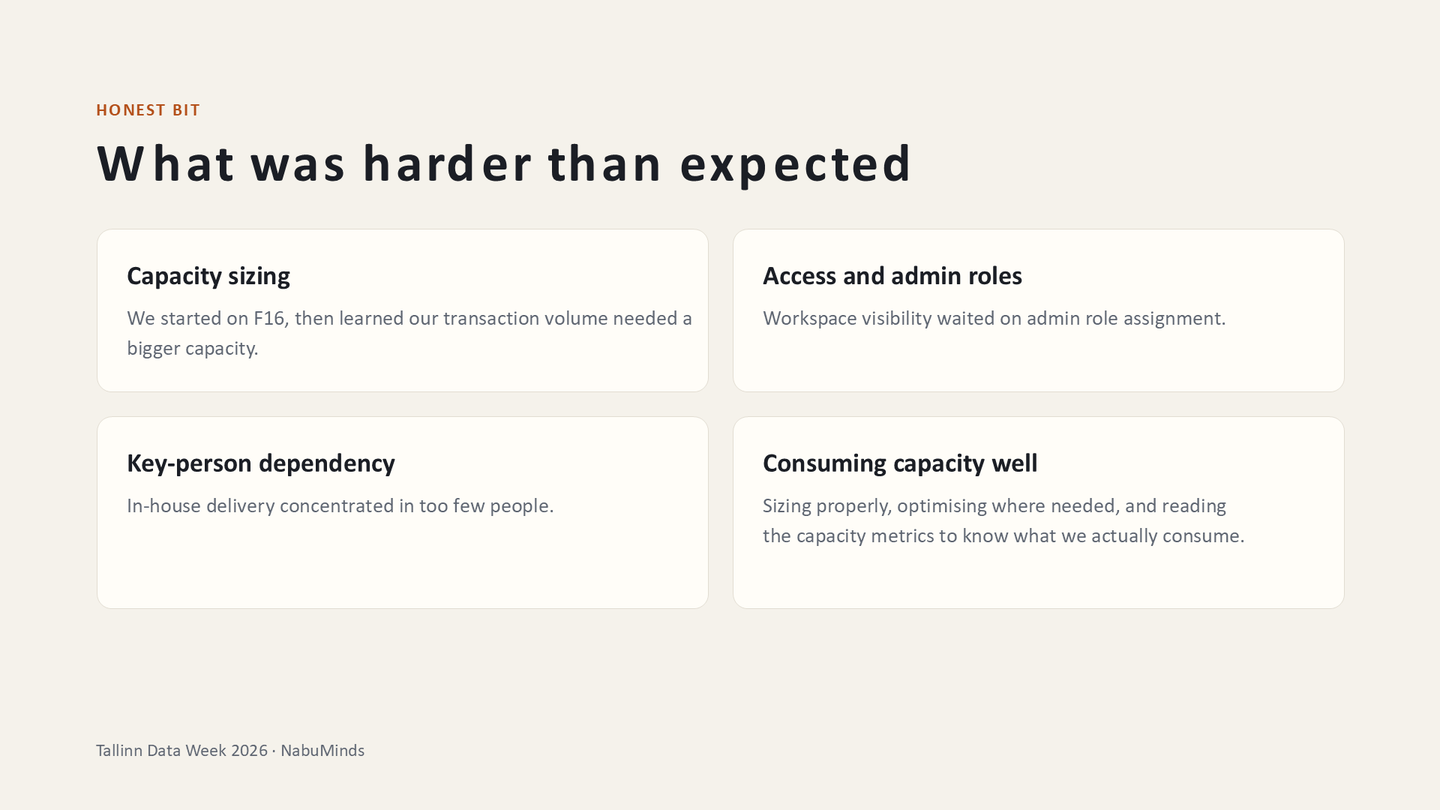
Capacity was also the part that was harder than we expected. We started on an F16 capacity and underestimated our data volume. In a company with yearly budgets, it is easier to size down than up. Asking for more money is another business case.
At first, finding out what used the capacity took some guessing, together with the data engineers. My most important lesson: treat capacity as a cost model from week one.
What does Fabric Real-Time Intelligence add?
The data agent answers questions. Real-Time Intelligence, the part of Fabric for live data and alerts, warns the business before anyone has to ask.
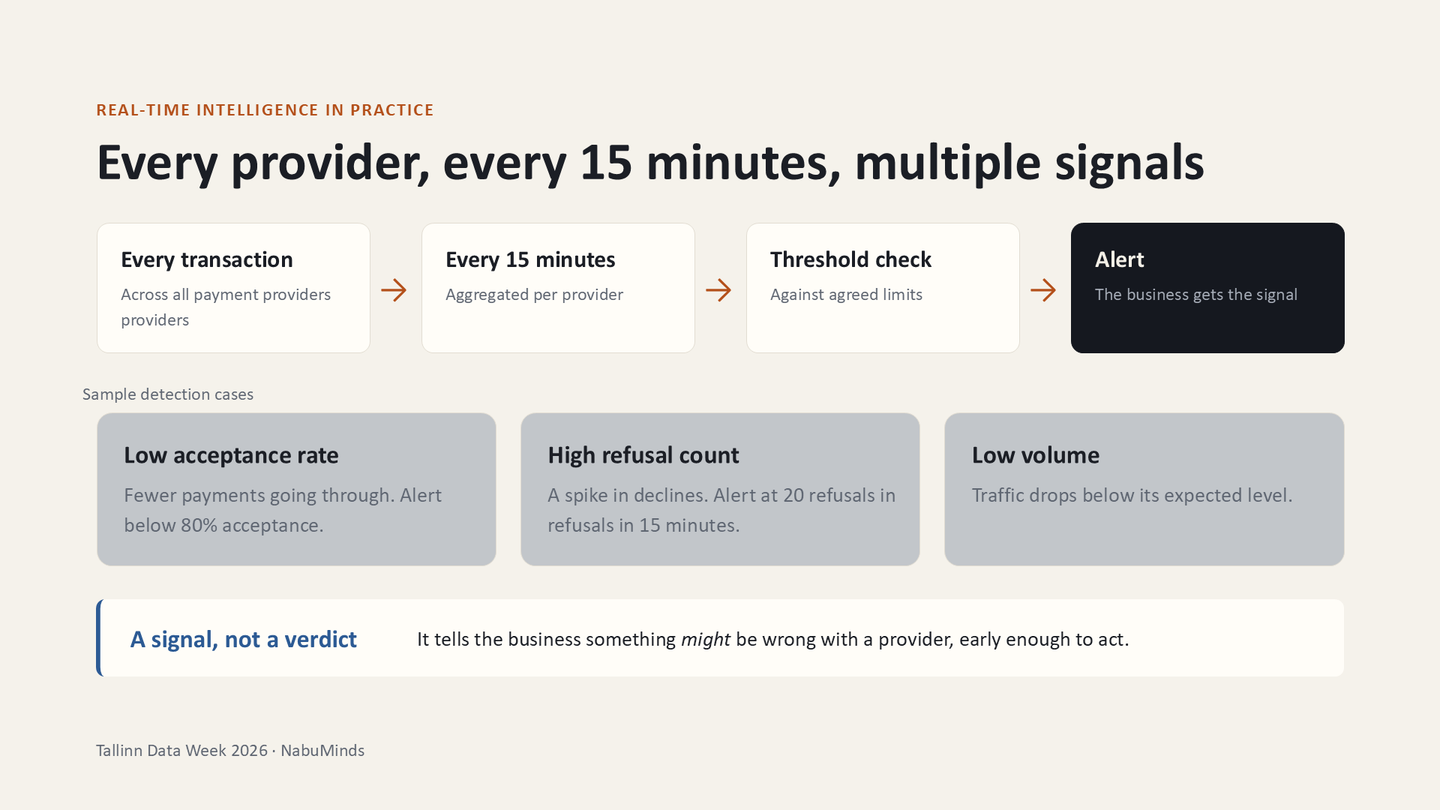
Every payment transaction is checked. Every 15 minutes, the numbers are aggregated per payment provider. Fifteen minutes is the freshest data our warehouse gives.
The numbers are then compared with agreed thresholds, which we update over time. One alert fires when the acceptance rate falls below 80%. Others watch for a spike in refusals and for low volume.
On stage I called each alert “a signal, not a verdict”. It tells the business that something might be wrong with a provider, early enough to act.
This matters because problems are expensive. On average, the client loses about 10,000 euros for every hour a payment provider has a problem. That can happen ten or more times a month, so about 100,000 euros a month.
Two details keep the alerts useful. An alert does not repeat every 15 minutes. A second alert says when the numbers are back to normal, so the team knows its fix worked.
What should you check before the business relies on a data agent?
- Collect the questions the business already asks. Ours were at least ten a week, each one a ticket.
- Ground the agent on curated semantic models, such as a Gold layer, not on raw tables.
- Describe every field and define every relationship in those models.
- Add synonyms and plain-language instructions in Prep data for AI.
- Set the guardrails before go-live: scope, instructions and who has access.
- Test on real questions, fix what fails, then run the same questions again.
- Test once more on questions nobody on your team wrote.
- Run a beta with real users and read the logged answers.
- Check the capacity, because the agent shares it with your reports and data loads.
Common questions
How accurate was the data agent?
On 80 real questions, it answered 75% correctly at first. After we fixed the field descriptions and business preferences, it scored 93% on the same questions. On 80 new AI-generated questions, it scored 95%.
Does a data agent learn from past questions?
You can store example queries and example answers in a Fabric data agent. Every answer is also logged and kept for 28 days. That lets you see what users asked.
Does a data agent need its own capacity?
Ours runs on the client's single production capacity, next to the reports. That means it draws from the same pool. Pieter Jansen's slide advised giving agents their own capacity once they are more than a pilot.
What does a real-time payment alert check?
Every 15 minutes, it compares each payment provider's numbers with agreed thresholds. Examples are an acceptance rate below 80%, a spike in refusals and low volume. A second alert says when the numbers are back to normal.
The programme and the recording of that morning are on the 21 October event page.