Article · AI on Fabric
Which Power BI MCP server to use, and how to set it up
Power BI and Fabric MCP servers compared: which builds models, which only reads, how to set one up in VS Code or Claude, plus a safety checklist.


For most teams on Power BI and Microsoft Fabric, the answer is two servers: the Power BI Authoring MCP server to build and change semantic models, and the Fabric IQ MCP server to let an AI assistant read and query the reports you already have. Add the Fabric Core MCP server only when the agent must manage workspaces, and publish a Fabric data agent as an MCP server when people need curated answers rather than raw DAX.
Every status below was checked on Microsoft Learn on 9 November 2026. This area changes almost monthly, so check the linked pages before you roll anything out.
What is a Power BI MCP server?
The Model Context Protocol (MCP) is an open standard for how AI assistants find and call tools: a server offers them, a client calls them, and the app around the client is the host. With GitHub Copilot in VS Code, VS Code is the host, Copilot the client and Power BI the server.
A Power BI MCP server lets an AI agent work with semantic models and reports. A semantic model is the layer behind a Power BI report: tables, relationships, measures and business names. Depending on the server, the agent can read a model's structure, run DAX queries or change the model itself.
The topic is not new to the group. At the meetup at BCS Koolitus in Tallinn on 28 May 2026, Kerim Yiğit Özsoy, business intelligence analyst at Proekspert, gave a talk called Power BI MCP. Since then, the Fabric IQ and Fabric Core MCP servers have become generally available, both in September 2026.
Which MCP servers exist for Power BI and Microsoft Fabric?
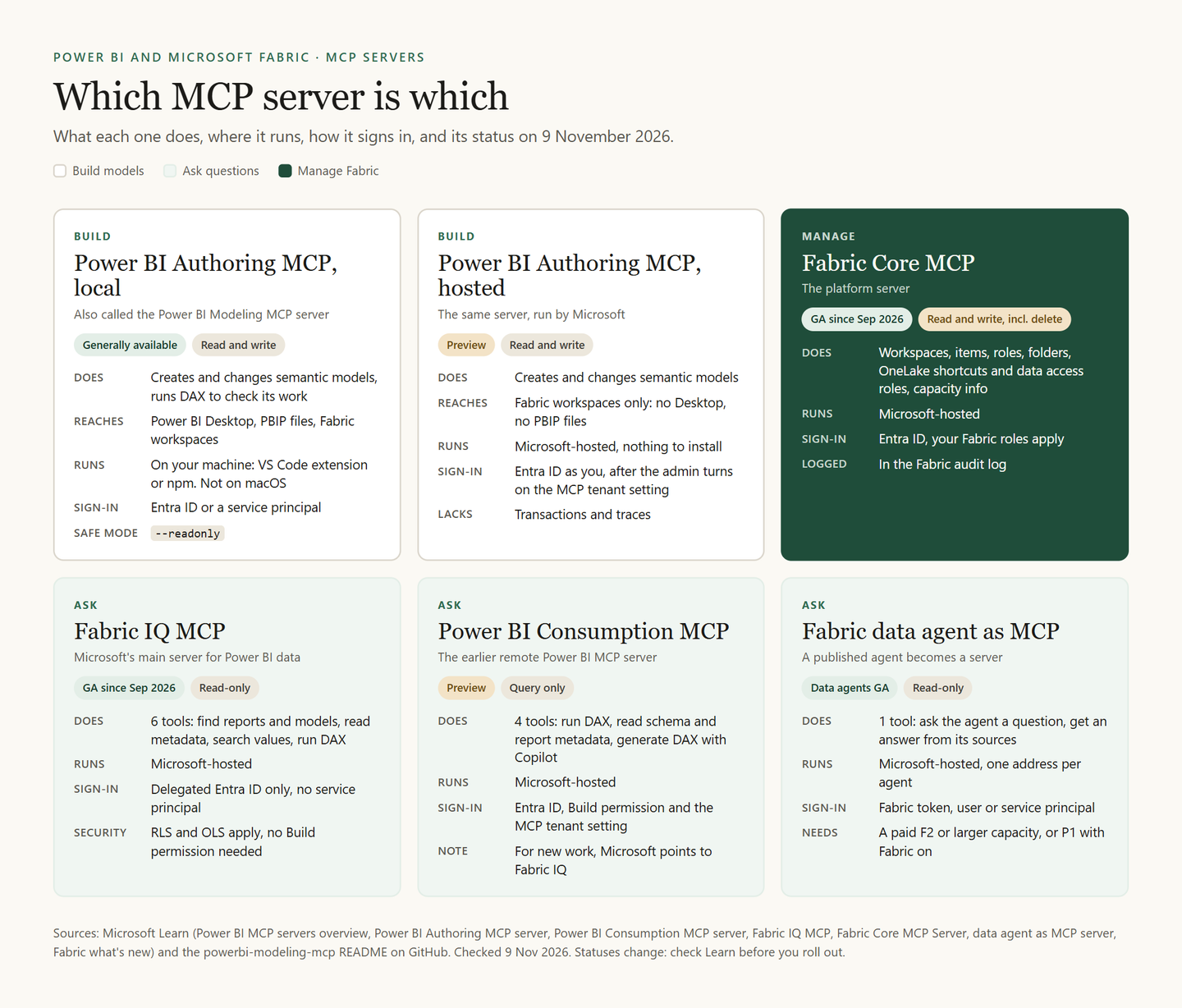
Microsoft's directory of Microsoft Fabric MCP servers listed 14 entries on 9 November 2026. Five of them matter to most Power BI teams: Fabric IQ, Fabric Core, the data agent, and the local and hosted versions of Power BI Authoring. The older Power BI Consumption server is not listed there but is still documented.
The Power BI Authoring MCP server, or the "modeling" server
This is the server people mean by the Power BI modeling MCP server: its GitHub repository and npm package are still called powerbi-modeling-mcp. It lets an agent create, change and delete tables, columns, measures, relationships, hierarchies, calculation groups, perspectives, partitions and security roles. It can rename or translate hundreds of objects in one go, check a model against best practices and run DAX to validate its work, up to 100,000 rows per query. It runs in two ways:
- Local, generally available. It runs on your machine and reaches Power BI Desktop, Power BI Project (PBIP) files on disk and models in Fabric workspaces. It supports service principals, transactions and traces. It does not run on macOS.
- Hosted, in preview. Microsoft runs it at an endpoint, so there is nothing to install. It reaches only models in Fabric workspaces, with no transactions or traces.
Microsoft recommends the hosted version where your setup allows it. It also warns against registering both at once: the agent then sees two overlapping sets of tools and spends extra tokens on every request.
The earlier remote Power BI MCP server
Older guides show a remote server at api.fabric.microsoft.com/v1/mcp/powerbi, now called the Power BI Consumption MCP server. It is still in preview, stays available for existing setups and needs Build permission. Its four tools run DAX, read the schema and report metadata, and generate DAX with Copilot, which needs a Copilot licence. For new work, Microsoft points to Fabric IQ.
What is the Fabric IQ MCP server?
Fabric IQ MCP is Microsoft's main server for bringing Power BI data into AI clients. It is generally available, remote and read-only. Its six tools find reports and semantic models by name or URL, read their metadata, search for stored values and run DAX queries.
It has no tool that answers in plain language: your AI client picks the tools, writes the DAX and explains the result. Microsoft recommends pairing it with the Fabric IQ skill from Skills for Fabric. Row-level and object-level security still apply. You need no Build permission, only access to the report or model, and the content need not sit on a Fabric or Premium capacity.
It works only where the tenant's home region supports all Fabric workloads: not in Power BI-only regions or sovereign clouds. It does not yet cover dashboards, paginated reports, Power BI apps, data agents or ontologies (they have their own Ontology MCP server), and it signs in only as a user, never as a service principal.
What does the Microsoft Fabric Core MCP server do?
Fabric Core MCP is the platform server. It lists, creates, updates and deletes workspaces and items, grants and revokes workspace roles, manages folders, OneLake shortcuts and data access roles, and shows capacity information. Fabric records supported operations in its audit logs under the identity that ran them. It does not query or change the data inside lakehouse tables.
Can a Fabric data agent be an MCP server?
Yes. A published Fabric data agent becomes an MCP server with a single tool: the agent itself. A client sends a question and gets an answer grounded in the agent's sources: lakehouses, warehouses, semantic models, KQL databases, mirrored databases or ontologies. The agent's description becomes the tool's description, so write it with care.
The server address is in the agent's settings, on the Model Context Protocol tab, with an mcp.json file to download. The agent needs a paid F2 or larger capacity, or Power BI Premium P1 or larger with Fabric turned on, plus the tenant settings for cross-geo processing and storing for AI. Support for long-running questions, called MCP tasks, became generally available in September 2026.
Test the agent before anyone relies on it: our article on how to test a Fabric data agent before you trust it shows how NabuMinds did it in three rounds.
Which one should you use?
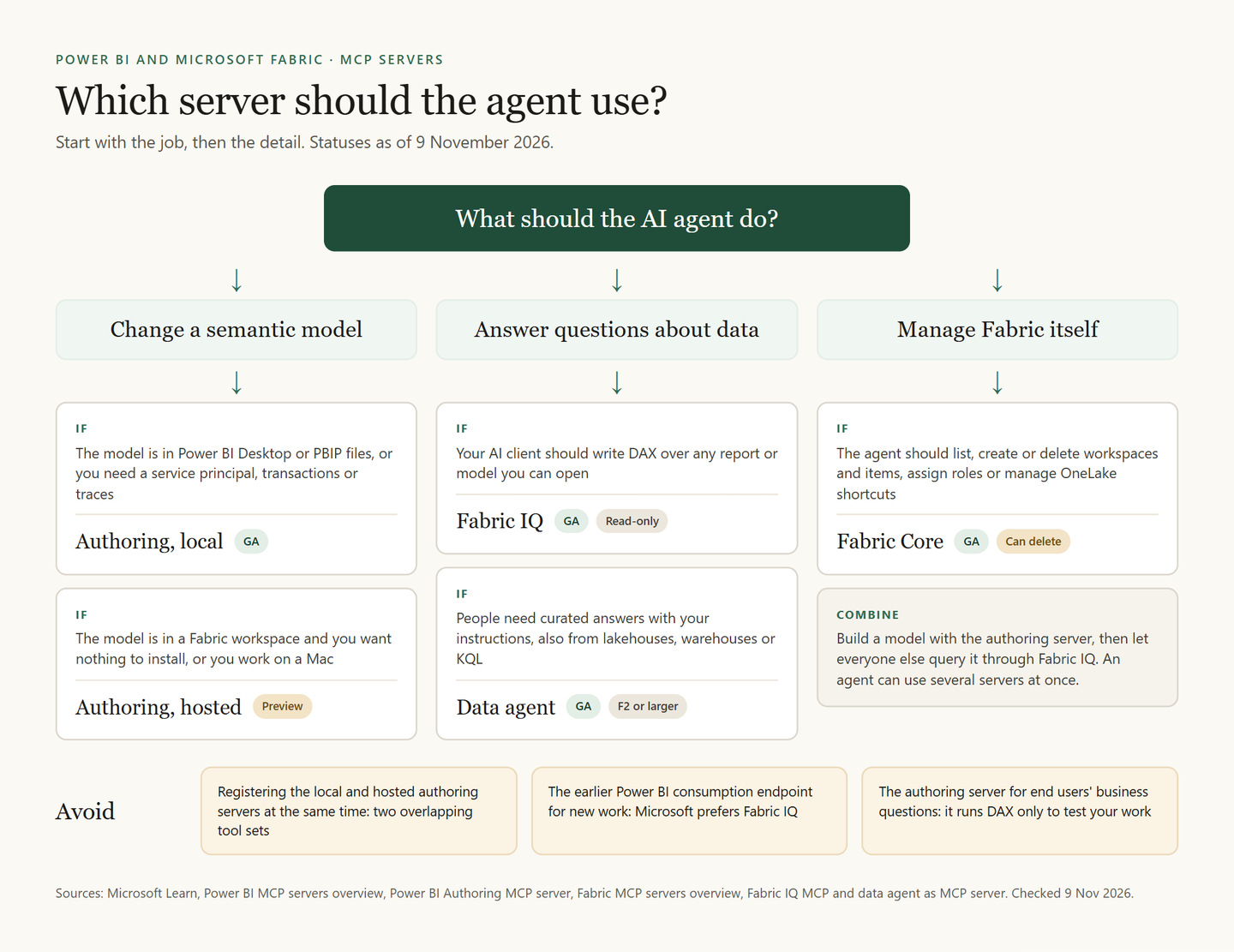
Start with what the agent should do. GA means generally available.
| The agent should | Use | Status |
|---|---|---|
| Change a model in Desktop or PBIP files | Authoring, local | GA |
| Change a model in a Fabric workspace | Authoring, hosted or local | Preview or GA |
| Answer questions over reports you can open | Fabric IQ | GA |
| Give curated answers from set sources | Data agent | GA |
| Create workspaces, items or role assignments | Fabric Core | GA |
How do you set up a Power BI MCP server, step by step?
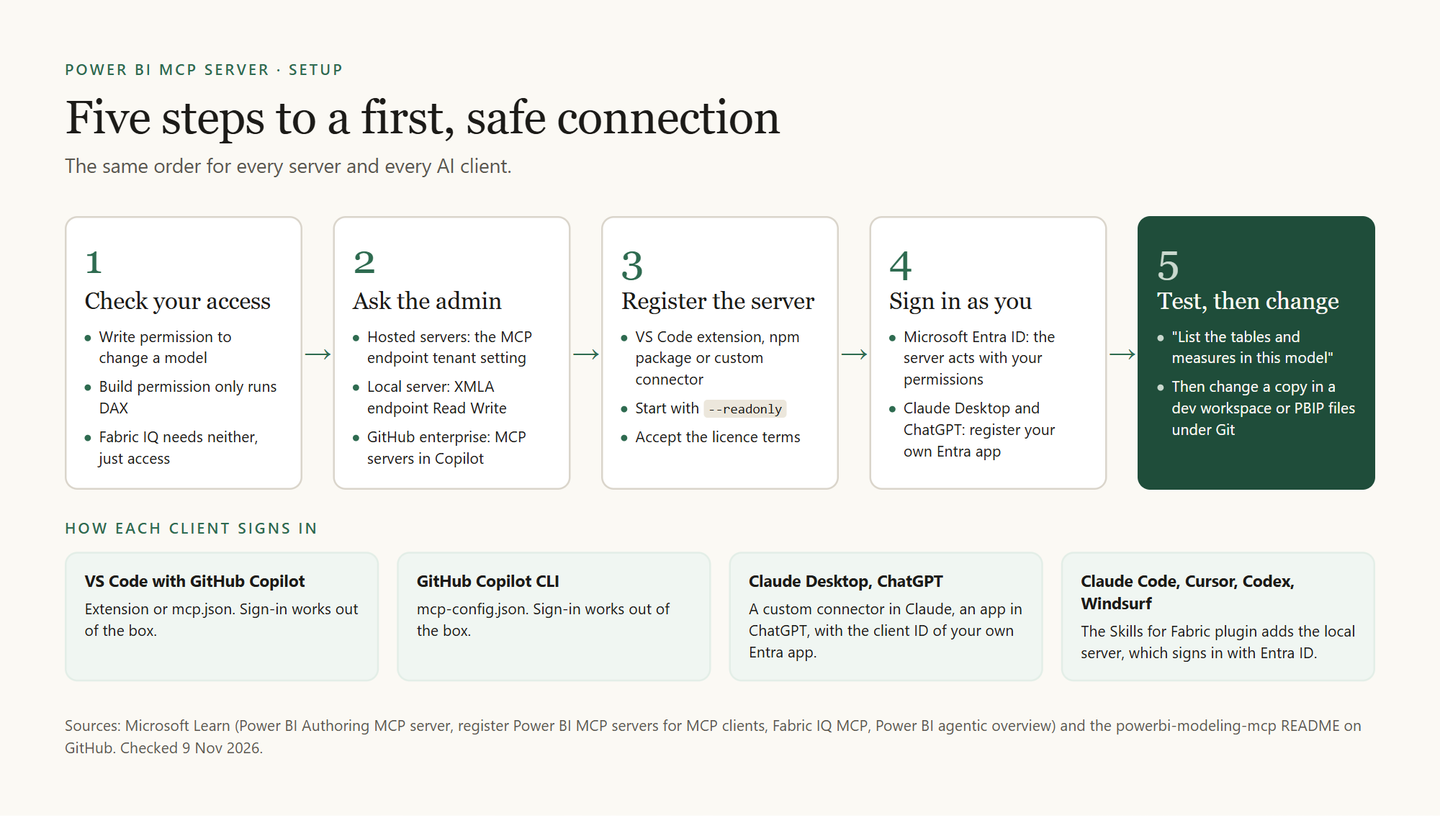
The example uses the local authoring server, with notes for other clients.
Check your permission on the model
To change a model, you need Write permission on it. With only Build permission, the authoring server can run DAX queries but cannot change anything. Fabric IQ needs no Build permission at all.
Ask your admin for the right settings
The hosted Power BI servers need the tenant setting Users can use the Power BI Model Context Protocol server endpoint (preview). The local server reaches workspace models through the XMLA endpoint, set to Read Write on the capacity; a workspace has that endpoint on a Premium or Fabric capacity or with Premium Per User. GitHub Copilot enterprise accounts also need the MCP servers in Copilot option, which is off by default.
Register the server in your client
Install the Power BI Authoring MCP extension in VS Code, or add the npm package to your client's MCP configuration. With
--readonly, it starts in safe mode and cannot write:{ "servers": { "powerbi-authoring-local": { "type": "stdio", "command": "npx", "args": [ "-y", "@microsoft/powerbi-modeling-mcp@latest", "--start", "--readonly" ] } } }The npm route asks you to accept the server's licence terms before its tools work. Or install the powerbi-authoring plugin from Microsoft's Skills for Fabric: it bundles the local server with modeling and report skills for the GitHub Copilot CLI, VS Code, Claude Code, Cursor, Codex and Windsurf.
Sign in with Microsoft Entra ID
The local server signs you in interactively, or uses a service principal with
--authmode serviceprincipal. For the hosted servers, VS Code and the GitHub Copilot CLI sign in out of the box. Claude Desktop and ChatGPT need an Entra app that you or an admin register, because Entra ID lacks dynamic client registration.Connect and test with a read-only question
Tell the agent which model to use, for example: "Connect to semantic model 'Sales' in Fabric workspace 'Sales Dev'". Then ask something harmless before any change, such as: "List the tables and measures in this model". Pick a deep-reasoning AI model: Microsoft says the model choice has a large effect on the result.
Ask for the change, then review it
Remove
--readonlyonly for a model in a development workspace or in PBIP files under Git. By default, the server asks for confirmation before its first edit to each model. Review the diff before you commit.
All the endpoints, for copying
# Power BI Authoring, hosted (preview)
https://api.fabric.microsoft.com/v1/mcp/powerbi/authoring

# Fabric IQ (generally available)
https://fabriciq.svc.cloud.microsoft/v1/mcp/fabriciq

# Fabric IQ, if your organisation uses private links
https://api.fabric.microsoft.com/v1/mcp/fabriciq

# Fabric Core (generally available)
https://api.fabric.microsoft.com/v1/mcp/core

# Power BI Consumption, the earlier endpoint (preview)
https://api.fabric.microsoft.com/v1/mcp/powerbi

# A published data agent
https://api.fabric.microsoft.com/v1/mcp/workspaces/{WorkspaceId}/dataagents/{DataAgentId}/agent
In VS Code, add a remote server with the command MCP: Add Server, choose HTTP and paste the address.
What if it does not work?
These are the fixes Microsoft lists for the authoring server.
| Symptom | Check |
|---|---|
| Server missing from the tool list | Agent mode; MCP servers in Copilot |
| Hosted sign-in fails | Tenant setting; your own Entra app |
| Reads work, every change fails | Write permission; XMLA Read Write |
| Reconnects before every step | A client that keeps the session, or local |
Are MCP servers a risk for enterprise Power BI?
They can be, but not as people often fear. An MCP server does not widen anyone's access: it acts with the permissions of whoever signed in. The real risks are three. An agent with Write permission can make changes that may not be reversible. Metadata and query results can travel on to your client's AI model provider. And a careless identity can skip security: on the consumption server, a service principal does not enforce row-level security.
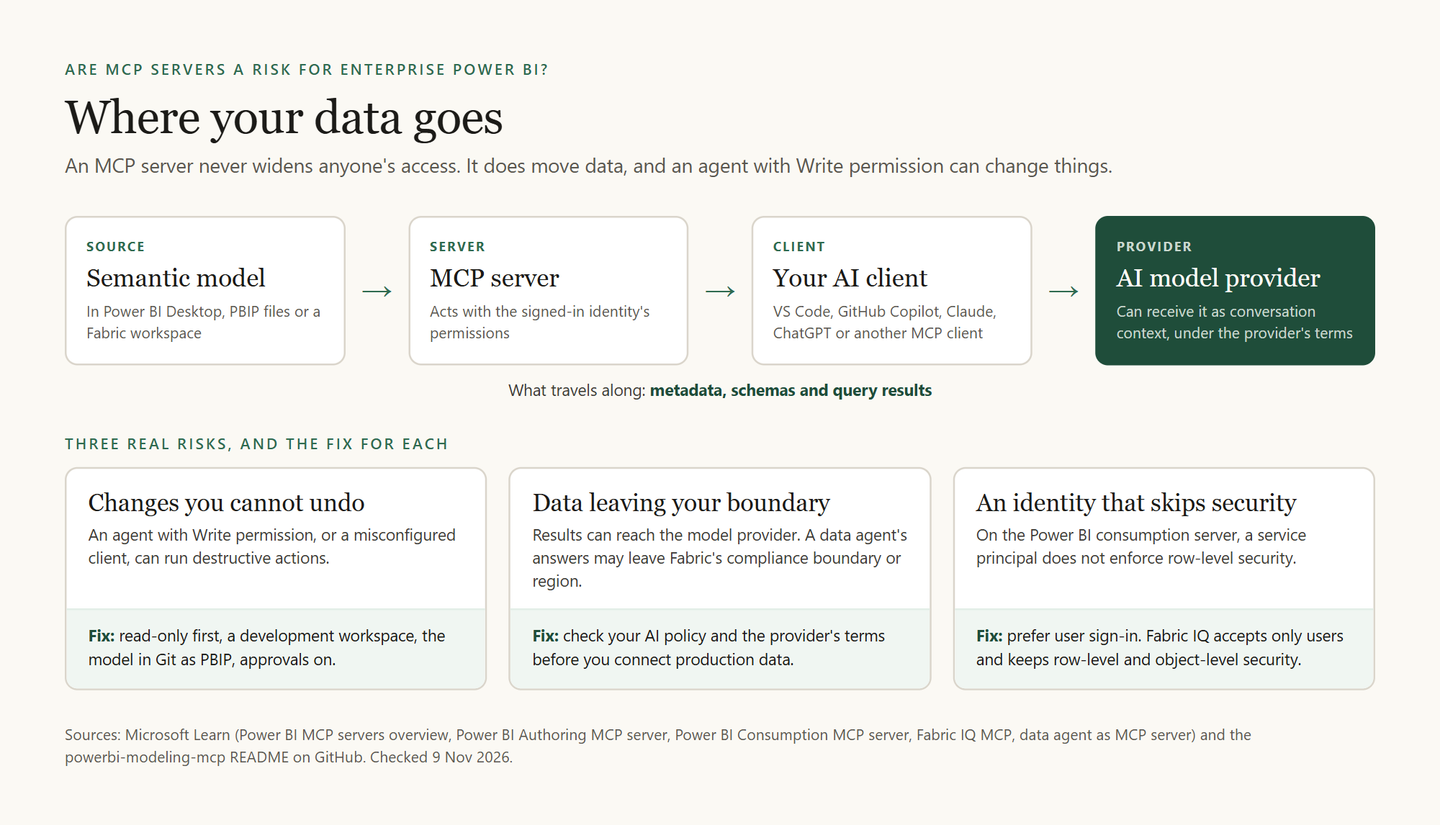
So treat an agent like any external tool that can write to production. This checklist follows Microsoft's guidance on Learn.
Start read-only, on a copy
Run the local server with
--readonly, or use Fabric IQ, which cannot write. Point an agent that can write at a copy in a development workspace, never at the production model, and give it the lowest role that does the job.Keep the model in Git
Back up first. Store the model as PBIP files under Git, so every change shows up as a diff you can review and revert, and Git history becomes your audit trail. Learn also warns that after a write through the XMLA endpoint, which the local server uses for workspace models, a model built in Power BI Desktop can no longer be downloaded as a PBIX file. Keep the original file.
Decide the tenant settings on purpose
The MCP endpoint setting controls the two hosted Power BI servers, not Fabric IQ. Only turning off the XMLA endpoint blocks the local server, and that stops every other XMLA tool too. Fabric IQ relies on users consenting to two Power BI permissions, which admins can restrict or route through an approval workflow.
Keep approvals on in the client
Review each tool call before it changes something: the Fabric Core server can delete workspaces and replace an item's whole set of OneLake data access roles. Blocking destructive operations is not part of the MCP standard, so not every client offers it.
Check where the answers go
Check your AI policy and the model provider's terms before you connect production data: a data agent's answers may leave Fabric's compliance boundary or region. For queries, prefer user sign-in.
Frequently asked questions
Is the Power BI MCP server free?
Learn lists no price for the servers themselves. The costs sit underneath. For workspace models, the local server needs the XMLA endpoint, so a Premium or Fabric capacity or a Premium Per User licence. A data agent runs on a paid F2 or larger capacity. The consumption server's DAX generator needs a Copilot licence. Fabric IQ also works with content outside Fabric or Premium capacity. For prices, check Microsoft's current price list.
Can the agent change report pages?
Not through the authoring server: it changes only the semantic model, not report pages or diagram layouts. For reports, Skills for Fabric has a report skill that edits PBIR report definitions.
Can I use Claude or ChatGPT instead of GitHub Copilot?
Yes. For the hosted servers, register a single-tenant Entra app with the delegated Power BI permissions the server needs, and give its client ID to Claude Desktop as a custom connector or to ChatGPT as an app. Fabric IQ needs Item.Read.All and Item.Execute.All. The local server works in any client that can start it.
What is the difference between Fabric IQ MCP and a data agent MCP server?
Fabric IQ hands your AI client raw tools over any report or model you can open, and the client writes the DAX. A data agent is one tool with its own instructions and sources, lakehouses included, and writes the queries itself.
How many Fabric MCP servers are there?
Microsoft's directory on Learn, Choose a Microsoft Fabric MCP server, listed 14 entries on 9 November 2026. Beyond the Power BI servers above, it has servers for Data Warehouse, Eventhouse, Activator, ontologies and Data Factory, among others.