Article · Engineering craft
What is a Microsoft Fabric app, and how do you build one?
A Microsoft Fabric app is a web app with its own database and sign-in, run by Fabric. What a deploy creates, what you need, and how to build one.


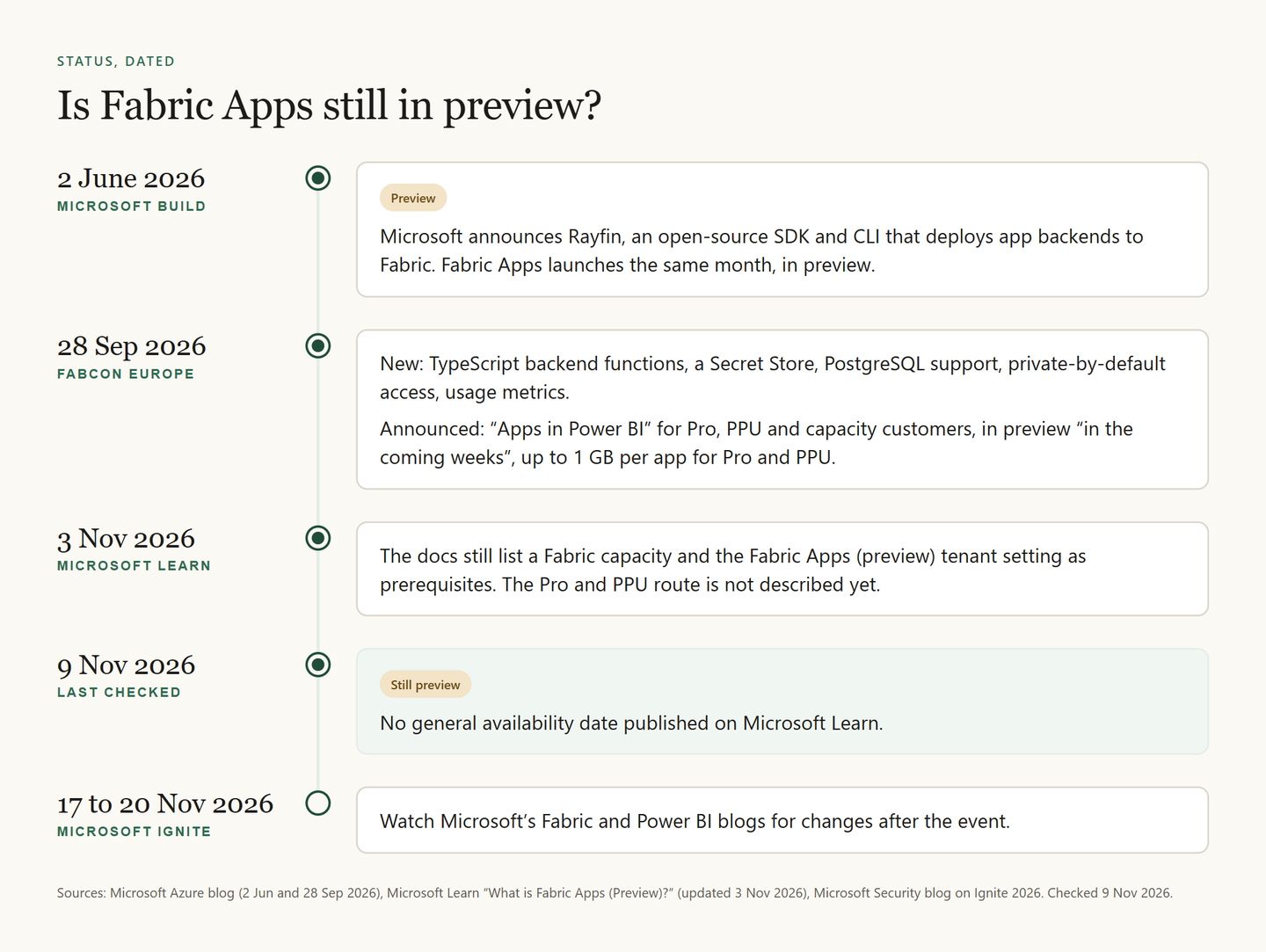
A Microsoft Fabric app is a custom web application that runs inside a Fabric workspace, where Fabric provides the database, the APIs, the sign-in and the hosting. You build it in TypeScript with Microsoft's open-source Rayfin SDK and CLI, and deploy it with one command, npx rayfin up. As of 9 November 2026, the feature is in preview.
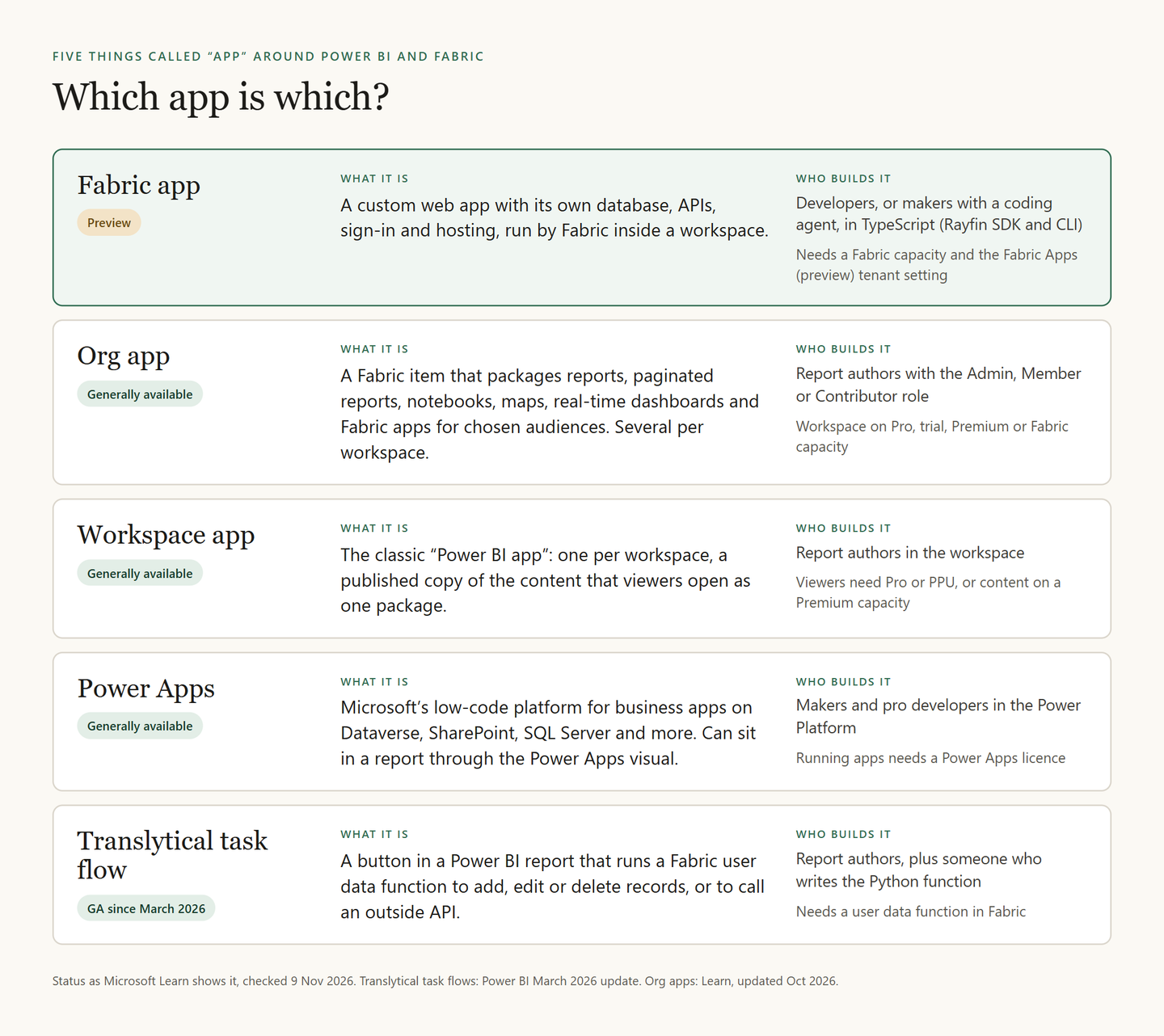
The name causes confusion: around Power BI and Fabric, five different things could be called an app. This guide sorts them out and follows Microsoft's quickstart step by step. Every product fact comes from Microsoft Learn or Microsoft's blogs, checked on 9 November 2026.
The group's November meetup had a Fabric app demo on its programme too. DIGMATIX Estonia wrote the next day that its data engineer Mihkel Nugis introduced what the Fabric app is and how it works in practice, on 5 November 2026 at the company's Tallinn office. Our recap of that evening covers the FabCon Europe news from the same meetup.
What is a Fabric app?
Fabric Apps is Microsoft's name for the feature, and one app built with it is a Fabric app. It lets you build data-driven applications on Fabric without writing your own backend.
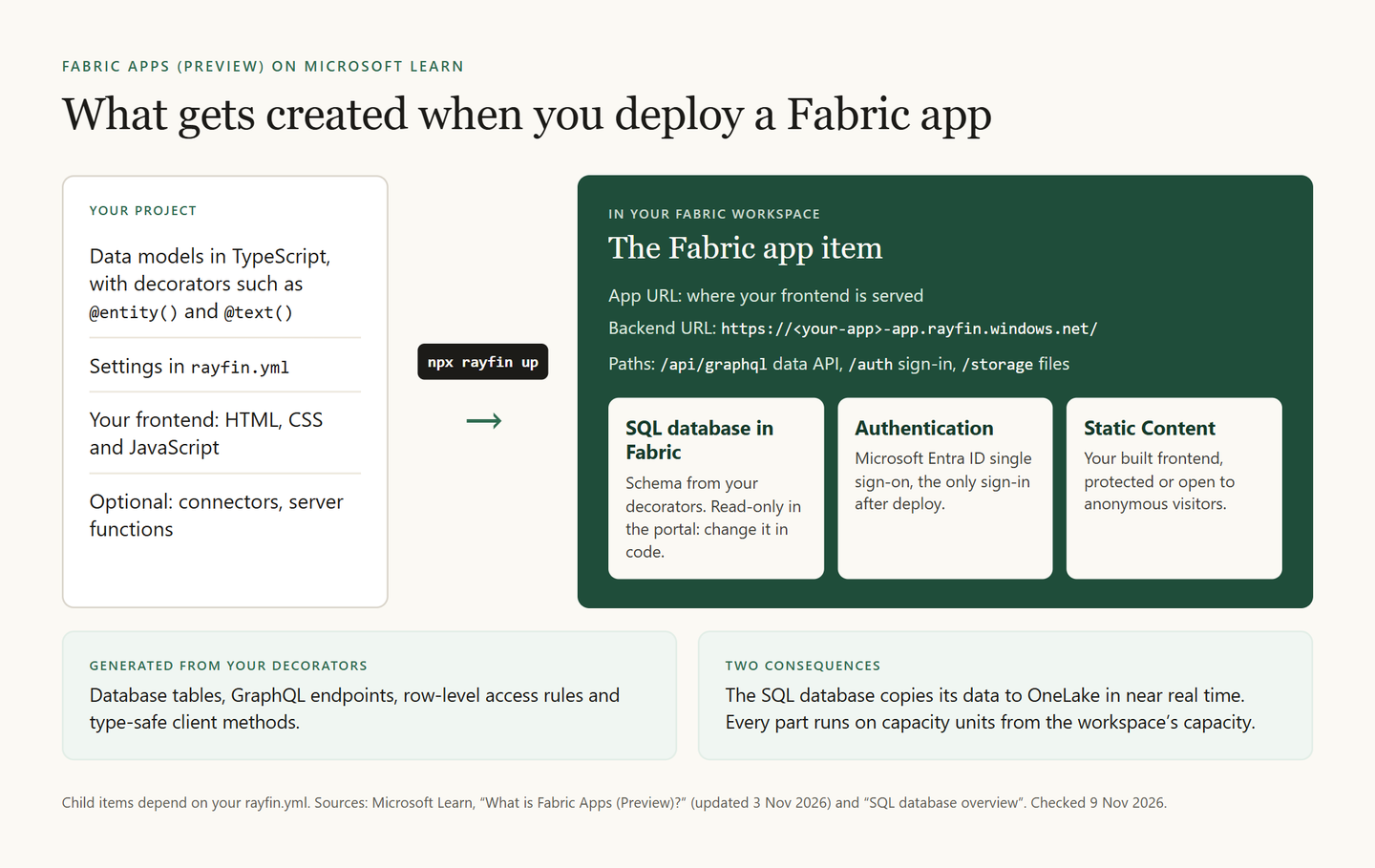
You describe your data as TypeScript classes with decorators such as @entity() and @text(). From those, Fabric generates the database tables, GraphQL endpoints to read and write the data, row-level rules for who may see and change which rows, and type-safe client methods for your frontend. Microsoft's own example, shortened:
@entity()
@role('authenticated', '*', {
  policy: (claims, item) => claims.sub.eq(item.user_id),
})
export class Todo {
  @uuid() id!: string;
  @text({ min: 1, max: 100 }) title!: string;
  @boolean() isCompleted!: boolean;
  @text({ max: 255 }) user_id!: string;
}
The @role line holds the row-level rule: in this example, a signed-in user's ID (claims.sub) must match the row's user_id.
Fabric also hosts your frontend and signs users in with Microsoft Entra ID single sign-on. After deployment, that is the only sign-in method; email and password work only while you develop on your own machine.
An app can also use data you already have. Typed connectors reach a lakehouse, a warehouse, a SQL database in Fabric or a Power BI semantic model.
Microsoft suggests four uses: quick prototypes, internal tools and dashboards, custom front ends for exploring data, and backends for AI agents that need to keep state.
The SDK behind it, Rayfin, was announced at Microsoft Build on 2 June 2026, and Fabric Apps launched in preview that month. Because the app runs in Fabric, its data lands in OneLake, next to the rest of your Fabric data. At FabCon Europe on 28 September 2026, Microsoft announced TypeScript backend functions, a Secret Store, PostgreSQL support, private-by-default access and usage metrics. Learn's What's new page lists the Fabric Apps features under preview.
What gets created when you deploy a Fabric app?
When you run npx rayfin up, Fabric creates a Fabric app item in your workspace. Under it come child items, based on the settings in your rayfin.yml file:
- SQL database in Fabric. A managed database with the schema from your decorators. You can run queries on it in the portal, but it is read-only there: schema changes come from your code.
- Authentication. Sign-in brokered by Fabric through Microsoft Entra ID, with the identity people already use for Fabric.
- Static Content. Your built HTML, CSS and JavaScript, served from the app's own address, either protected or open to anonymous visitors.
Each app gets one backend address, https://<your-app>-app.rayfin.windows.net/, with paths for the data API (/api/graphql), sign-in (/auth) and file storage (/storage). The frontend has its own App URL.
Two things follow. A SQL database in Fabric copies its data to OneLake automatically, in near real time, so notebooks and Power BI reports can use what the app collects. And the app's services consume capacity units from the capacity its workspace runs on.
What do you need before you build a Fabric app?
A Fabric capacity is the fixed block of computing power that a workspace runs on, and Fabric Apps needs one. Not sure whether your team has one, or needs one? Is Microsoft Fabric the same as Power BI? walks through the licence choices. As of 9 November 2026, Microsoft Learn lists these prerequisites:
| You need | Details | Set up by |
|---|---|---|
| A Fabric capacity | Assigned to the workspace | Capacity admin |
| The tenant setting | Fabric Apps (preview) | Fabric admin |
| A workspace role | Contributor, Member or Admin | Workspace admin |
| Node.js | Version 20 or later | You |
| A supported region | The capacity's region, see below | Capacity admin |
Which regions support Fabric Apps?
Microsoft's region table, updated on 3 November 2026, does not mark Fabric Apps as missing in North Europe, West Europe or most other European regions that run all Fabric workloads. In Europe, it marks Fabric Apps as not available in UK South, Poland Central, Spain Central and Switzerland West. If your home region lacks a feature, Microsoft notes that you can create a capacity in a region that has it.
Is a Fabric app free?
As of 9 November 2026, Microsoft Learn says a Fabric app consumes capacity units from its workspace's capacity, like the rest of your Fabric work. On 28 September 2026, Microsoft announced that "Apps in Power BI" would come to preview in the coming weeks for Power BI Pro, Premium Per User and Fabric capacity customers, with Fabric Apps and Fabric Database capabilities at no additional cost for Pro and PPU, up to 1 GB per app. On 9 November, Learn did not yet describe that route. Capacity sizes and euro prices are in the group's guide to how Microsoft Fabric pricing works in 2026; check Microsoft's current price list before you budget.
How do you build a Fabric app, step by step?
These steps follow Microsoft's quickstart Create your first Fabric apps project and tutorial Create and deploy your first Fabric app with the Rayfin CLI, as they stood on 9 November 2026. Commands can change during the preview, so check both pages first.
Get the tenant setting turned on
A Fabric admin opens the admin portal, goes to Tenant settings and turns on Fabric Apps (preview), for the whole organisation or for chosen security groups. The change can take a few minutes to apply.
Prepare a workspace and your machine
Pick a workspace on a Fabric capacity where you are Contributor, Member or Admin. Install Node.js 20 or later.
Create the project
npm create @microsoft/rayfin@latest my-app
cd my-app
The default template, Universal App, keeps backend settings in
rayfin/and the frontend inpackages/frontend/. Data is off until you add it withnpm run pack:add -- data-modeling.Sign in and deploy the backend
npx rayfin login
npx rayfin up
The backend runs in Fabric, not on your computer. To preview what a deploy would change, run
npx rayfin up --dry-run.Run the frontend
npm run dev
Open the local address the terminal prints. The CLI tutorial uses
npx rayfin devinstead, which also deploys the backend.Check the deployment
npx rayfin up status
After a successful deploy, the CLI prints the hosted App URL and a link to the item in the Fabric portal.
Share the app
Users need the Run and interact permission on the app. All workspace members get it by default. You can also add the app to an org app, next to the reports it belongs with.
You can also start in the Fabric portal: New item > App creates the item and shows a command that downloads a starter project. Or give the quickstart's ready-made prompt to GitHub Copilot or another coding agent, and review its files and output before you deploy.
For later changes, npx rayfin up db apply pushes schema changes only. A destructive change, such as removing a column, fails unless you add --force, which Microsoft warns can break the app.
Can a Fabric app use a Power BI semantic model?
Yes. Microsoft's data app template (--template dataapp) is built for it. You add the semantic model as a connector, and the app sends DAX queries through it with delegated access, so each user's own permissions apply. You need Build and Read permissions on the model, and the Semantic Model Execute Queries REST API tenant setting must be on.
Which is which: Fabric app, org app, workspace app, Power Apps or translytical task flow?
| Name | In one line | Status |
|---|---|---|
| Fabric app | Custom web app with its own database, run by Fabric | Preview |
| Org app | Reports and other items packaged for an audience | Generally available |
| Workspace app | The classic Power BI app, one per workspace | Generally available |
| Power Apps | Low-code app platform in the Power Platform | Generally available |
| Translytical task flow | Report button that writes back or calls an API | Generally available |
Power BI's new Apps page, still rolling out, labels three of them: Org app, Workspace app, and plain App for a Fabric app.
Fabric org app vs workspace app
Org apps are a Fabric item and, in Microsoft's words, a newer evolution of workspace apps. You can create several org apps per workspace, but only one workspace app. An org app shows the original items, so viewers see a change as soon as you save it; a workspace app holds a published copy, so changes appear only after you publish an update.
An org app can include Power BI reports, paginated reports, Fabric notebooks, maps, real-time dashboards and Fabric apps. Existing workspace apps keep working; Microsoft does not migrate them.
Fabric apps vs Power Apps
Power Apps is Microsoft's low-code platform for business apps on Dataverse, SharePoint, Microsoft 365, SQL Server and many other sources. You can place a Power App inside a Power BI report with the Power Apps visual, and running Power Apps needs a Power Apps licence. A Fabric app is code first: a TypeScript project that runs on your Fabric capacity and keeps its data in a SQL database in Fabric.
Fabric apps vs translytical task flows
A translytical task flow lives inside a Power BI report. A button calls a Fabric user data function, written in Python, which can add, edit or delete records in a SQL database, a warehouse or lakehouse files, or call an outside API. Translytical task flows became generally available in the March 2026 Power BI update. A Fabric app is a whole application with its own screens.
Which one should you use?
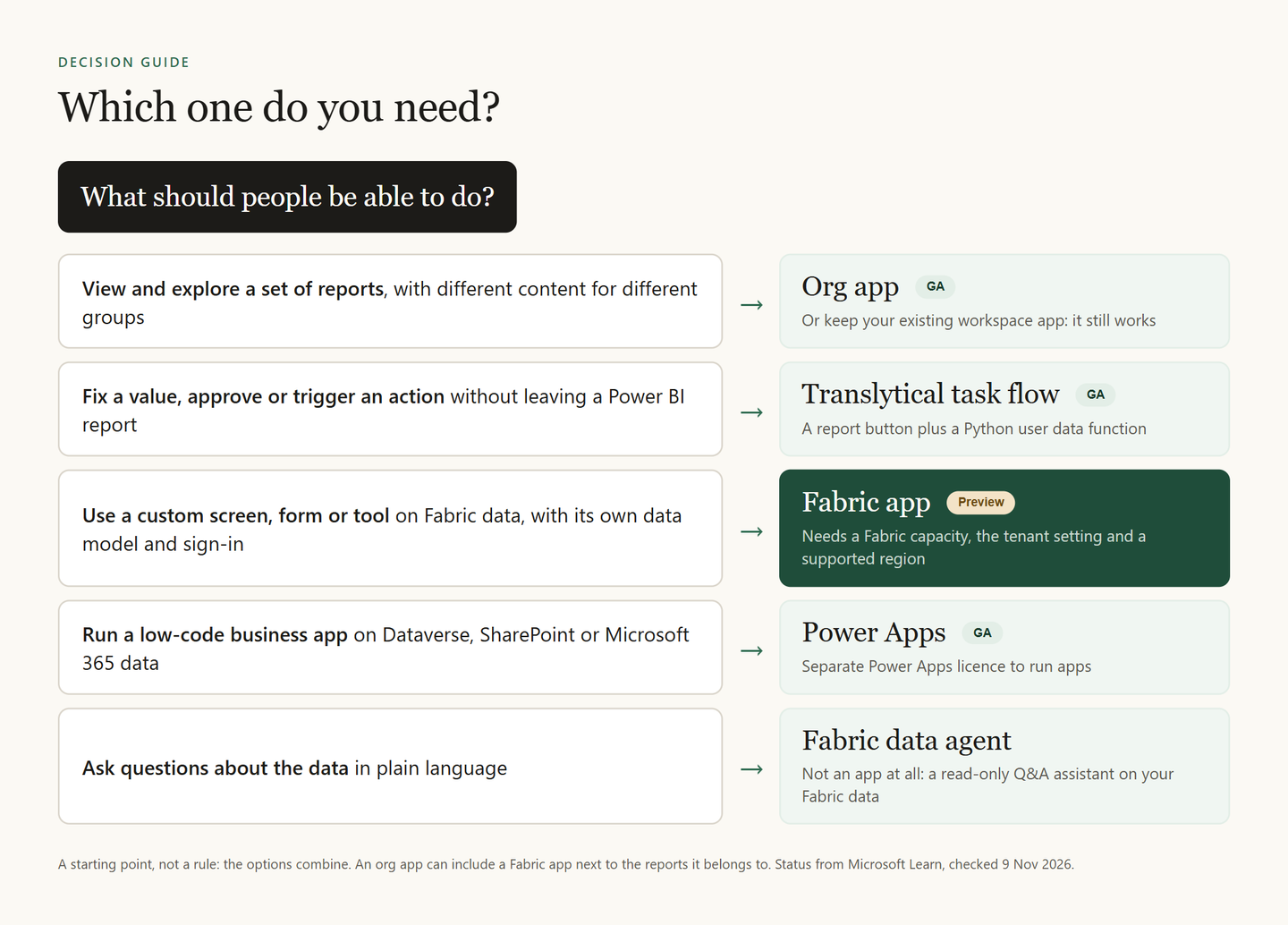
- People should view and explore reports: an org app, or the workspace app you already have.
- People should fix a value or trigger an action from a report: a translytical task flow.
- People need a custom screen, form or tool on Fabric data: a Fabric app, if your tenant accepts preview features.
- Your makers already build low-code apps on Dataverse or SharePoint: Power Apps.
- People want to ask questions in plain language: a Fabric data agent, which only reads data. Aaron Lee Amarga of NabuMinds described how his team tested one in How to test a Fabric data agent before you trust it.
Will Fabric apps replace Power BI reports or Power Apps?
Not according to Microsoft. Its Power BI documentation says reports remain a core analytics experience, and that Fabric Apps complement them where you need more flexibility, faster changes or a more tailored experience. Microsoft's Build and FabCon announcements for Fabric Apps say nothing about retiring Power Apps.
On 28 September 2026 Microsoft did announce a bridge from Power BI: agentic app creation in Power BI Desktop, where you describe an app on top of a semantic model and publish it to Fabric. By 9 November, Learn did not yet document it.
What does not work yet?
From Microsoft Learn, as of 9 November 2026:
- Not built for complex transactions. Microsoft says Fabric Apps might not suit apps that need complex multi-step transactions or stored procedures.
- One sign-in provider. Deployed apps sign people in with Microsoft Entra ID only; you cannot add a custom identity provider.
- Schema only from code. Manual schema changes in the database can break the app.
- Outside calls run as the owner. Server functions call outside services with the app identity, which today is the app item's owner. Grant that identity access to each resource.
- Org apps share the app, not its data. Adding a Fabric app to an org app grants access to the app, not to the items it reads or writes. Without those, users can open the app and still hit errors.
Frequently asked questions
Is Fabric Apps still in preview, and when will it be GA?
Yes. On 9 November 2026, Microsoft Learn marks Fabric Apps as a preview feature and gives no date for general availability. Microsoft Ignite runs from 17 to 20 November 2026, so check Microsoft's Fabric blog after that.
What is Rayfin?
Rayfin is the open-source SDK and CLI behind Fabric Apps, announced at Build on 2 June 2026. You define data models, backend logic and access rules in TypeScript, and Rayfin deploys the backend to Fabric.
How do you enable Fabric Apps?
A Fabric admin turns on the Fabric Apps (preview) tenant setting in the admin portal. The workspace must also run on a Fabric capacity in a supported region.
Do you need to code to build a Fabric app?
A Fabric app is a TypeScript project, but Microsoft's guides show a coding agent such as GitHub Copilot scaffolding and deploying one. Someone still needs to review what the agent wrote before it goes live.
Can a Fabric app write data back?
Yes. The app reads and writes its SQL database in Fabric through the generated GraphQL API, within the row-level rules you define. If you only need to write back a few values from inside a report, a translytical task flow is the smaller tool.